Short answer
A live stream is interrupted or blocked for music when the platform's automatic system matches the audio with content from a rights owner. YouTube's help page, checked on November 10, 2026, says that every live stream is scanned, that a placeholder image may replace the stream with a warning to stop, and that the stream may be temporarily interrupted or ended if the content stays. On air, stop the music at once. After the stream, the saved video can receive a claim. Whether you have the right to use a piece of music is a matter for the collecting society of your country, not for this page.
On this page
What YouTube says happens during the stream
These statements come from YouTube's help page about copyright in live streams, as it read on November 10, 2026.
- All live streams are scanned for matches with third-party content, including another live broadcast.
- When a match is found, a placeholder image may replace the stream, and you are warned to stop streaming the third-party content.
- If you stop and resolve the issue, the stream can continue.
- If the content stays, the stream is temporarily interrupted or ended. A stream can also be ended after a copyright strike or a Community Guidelines strike.
- If the stream stopped, YouTube says to check YouTube Studio for strikes. Access to live streaming can be restored once the listed issues are fixed.
Other platforms publish their own rules, and the action may be different from YouTube's. Read the page of each platform you stream to.
After the stream: the saved video
YouTube says that Content ID claims are made only after the live stream ends, and only if the video is archived. Its page about claims describes what follows.
- What the rights owner can choose: block the video from being viewed, monetize it with ads, or track its viewing statistics. The choice can differ by country or region, so a video can be visible in one country and blocked in another.
- A claim is not a strike. YouTube says claims are different from copyright removal requests and strikes, and that claims usually do not affect the channel.
- What you can do with a claimed video: leave it as it is; remove the claimed content, by muting the claimed audio, trimming the segment or replacing the song; or dispute the claim if you have the necessary rights. YouTube warns that a dispute without a valid reason can lead to a removal request and a strike.
Find where the music came from
| Where the music came from | What to do |
|---|---|
| Background music played in the room before the event or in the break, picked up by open microphones | Keep the room microphones closed outside the event, or stream a waiting screen with audio you have cleared |
| A video, an opener or a slide show with a commercial track | Check the audio of every file before the event and replace the track |
| A band or a singer performing a known song | The performance itself can be matched. The question is the license: see music rights for streamed services |
| The sound of a television, a phone or another broadcast in the room | Another live broadcast is also matched. Remove that sound from the mix |
| The computer audio of a presenter or a remote guest | Ask beforehand what will be played, and keep a hand on that channel |
What to do on air
- Stop the music at the source or mute its channel. The warning asks for exactly that.
- Keep the stream running with the voices. Do not end the stream to start another one unless the platform ended it.
- Write down the time and what was playing. You will need it to deal with the saved video.
- After the event, open the platform's panel and read what was applied to the stream and to the saved video.
- Keep your own recording. A recording on your computer does not depend on what the platform does to the saved video.
When the music is licensed
A license does not stop the automatic match. YouTube's page says that, if you licensed third-party content, you should ask the owner to add your channel to their allowlist through Content ID. Without that, the stream can be interrupted even with a license, and even if you restricted the stream to the territories where you hold the rights.
Ask for the allowlist days before the event and confirm that it was done. For what a license covers, consult the collecting society of your country. This page is not legal advice.
In NWK Live Production
Using NWK, like any streaming program, does not give a license for any music. What the program gives is control over what goes on air and a recording of your own.
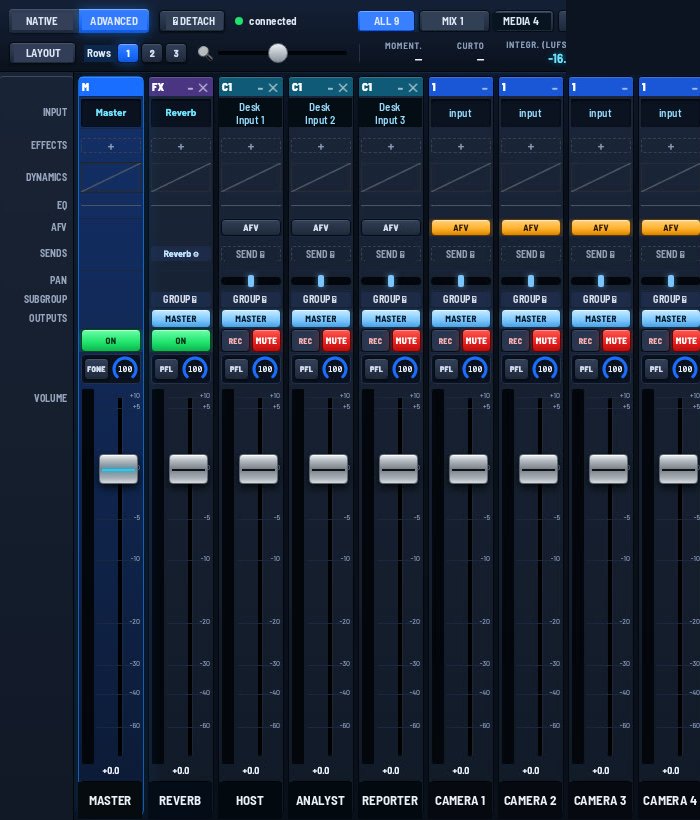
- Mute the channel: in the mixer, a click on ON mutes the channel and another click turns it back on.
- A source that must never sound: the speaker on the thumbnail disables the audio of the input, and the input then plays nowhere.
- Videos: the sound of a video file goes on air only when the video is on Program. The page on playing videos during the show covers the preparation.
- Your own recording: recording and streaming are separate, and the Program recording stays on the computer. Multitrack recording saves each mixer channel to its own WAV file, so a version without the music channel can be mixed afterward.
NWK is sold by subscription, with a 7-day free trial. See the pricing page.
Related questions
Why was my live stream interrupted if I have a license for the music?
The automatic system compares the audio with reference files and does not read contracts. YouTube's help page says that the owner of the content has to add your channel to their allowlist through Content ID; without that, the stream can be interrupted even with a license. Ask the owner for it before the event.
Can music playing in the background of the room get a stream blocked?
Yes. The match is made on the audio that reaches the platform, whatever its origin. Background music picked up by an open microphone is audio of the stream like any other. Close the room microphones when the event is not happening, or keep the stream on a waiting screen.
What happens to the recording of the live stream on YouTube?
According to YouTube, Content ID claims are made after the live stream ends, if the video is archived. The rights owner can block the video, monetize it or track it, and the choice can change by country. You can leave the claim, remove the claimed content or dispute it if you hold the rights.
In the NWK help center
- Turn a channel on or mute it (ON and MUTE)
- Enable or disable an input's audio
- Record each channel to a separate file (multitrack)
- Record the Program
Sources and references
- YouTube Help: copyright issues with live streams (checked November 10, 2026)
- YouTube Help: learn about copyright claims (checked November 10, 2026)
Written and reviewed by the NWK Live Production team (Setor 360 Tecnologia e Eventos Ltda). Published .
NWK mutes any channel with one click and records each mixer channel to its own file, apart from the stream, on Mac.
Try NWK free for 7 days