Short answer
A live stream goes out without audio when the sound stops at one point of the chain: the source, the mixer channel, the main mix, the encoder or the viewer's player. Look at the meters in that order. The last meter that moves shows where the sound still exists, and the break is in the next step. A local recording made at the same time tells you whether the problem is inside your computer or after it.
On this page
Follow the sound in order
| What you see | Where the break is |
|---|---|
| The channel meter does not move | Source: microphone, cable, audio device or permission |
| The channel meter moves, the main meter does not | Mixer: muted channel, fader down or channel not sent to the main mix |
| The main meter moves, the local recording is silent | Output of the program: the audio that goes to the encoder |
| The recording has sound, the stream does not | After your computer: platform or the viewer's player |
| Sound in one ear only | A mono source connected as one side of a stereo pair |
Do not skip steps. Raising the main fader does nothing when the microphone itself is delivering silence.
The source delivers nothing
- The microphone's own switch is off, or the battery of the wireless transmitter is dead.
- A condenser microphone needs phantom power from the interface or the sound desk.
- The cable is in the wrong input, or the input gain on the interface is at minimum.
- The program is listening to another device. After unplugging and reconnecting an interface, check which device is selected.
- The operating system has not given the program permission to use the microphone.
- The sound desk feeds the room but the output that goes to the computer is muted or not assigned.
The sound stops in the mixer
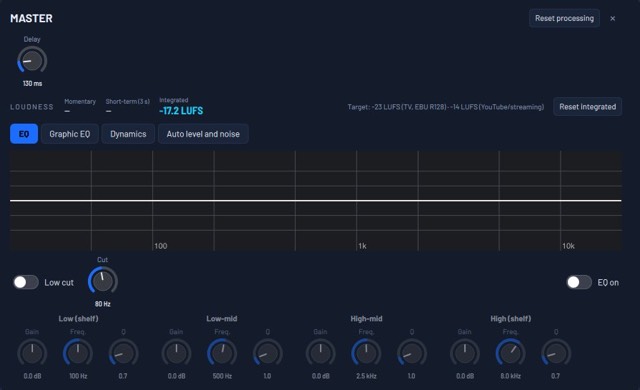
Three things silence a channel that has signal: a mute, a fader at the bottom and routing. Routing is the least obvious. A channel that is not assigned to the main mix shows level on its own meter and never reaches the stream.
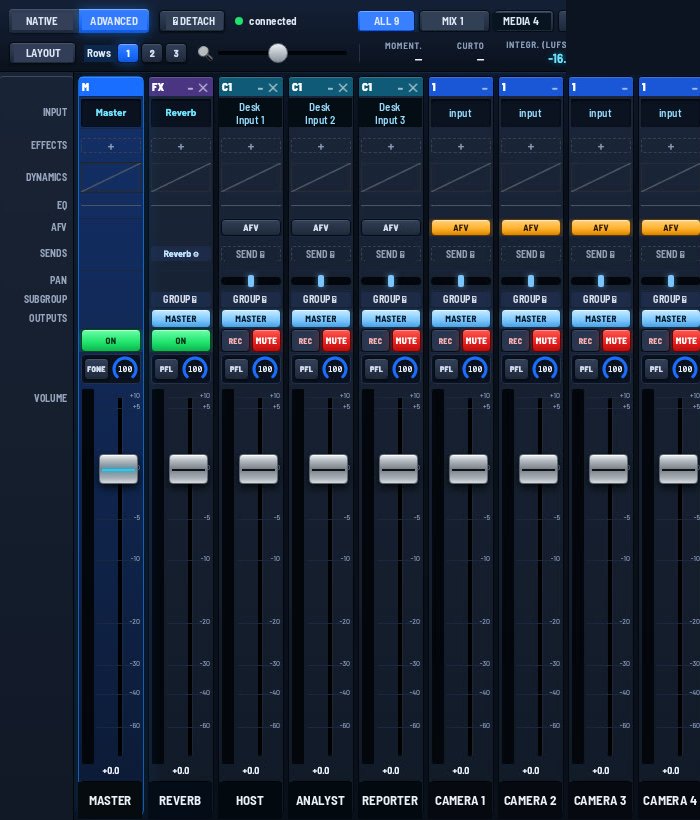
Audio-follows-video is another common cause. With it on, a channel opens only while its video source is on air. A lectern microphone tied to a camera goes silent when you cut to another camera. See audio follows video for when to use it.
What you hear is not what goes on air
Headphones and stream are separate paths. You can hear everything in the room or in the headphones while the stream is silent, and the opposite also happens: the stream is fine and your headphones are on another source. Trust the main meter and a recording, not the headphones alone.
After your computer
- Open the stream on a second device, on another network, with the player's volume up. Many players start muted.
- Check the audio settings of the stream: an audio bitrate or format outside what the platform accepts can be rejected. Use the values the platform publishes.
- Some platforms mute parts of a recording when they detect copyrighted music. The notice appears in the platform's own panel. For what you may play, consult the rights organization of your country.
Where to look in NWK Live Production
- Thumbnail speaker. It enables or disables the input's audio everywhere. Disabled, the channel button in the mixer shows OFF and the sound plays nowhere.
- ON and MUTE. The channel button shows the state. With AFV on, the input turns ON when it goes to Program and MUTE when it leaves; turn AFV off for a microphone that must stay open.
- MST. The MST button on the strip sends the channel to the Master. The stream and the recording always get the Master.
- Device. Settings › Audio marks a device that left the computer as (disconnected).
- Camera with no sound. A camera added with No audio has no speaker button; choose a device in the Audio field of its settings.
- One ear only. Add the interface channel as a mono channel instead of half of a stereo pair.
The full list is in no sound or the meter isn't moving. Before going live, the pre-flight check listens to the microphones for 3 seconds and warns about one that stays silent.
Related questions
Why can I hear the sound but the viewers cannot?
Because what you hear in the room or in the headphones is a different path from what goes to the stream. Check the meter of the main mix and make a short local recording. If the recording is silent, the sound is not reaching the main mix.
Why does the sound disappear when I switch cameras?
The channel is set to follow the video. With audio-follows-video on, the sound opens only while that source is on air. Turn it off on microphones that have to stay open all the time.
Why do viewers hear the sound in one ear only?
A mono microphone was connected as the left or right side of a stereo channel. Add that input as a mono channel so it goes to both sides.
In the NWK help center
- No sound or the meter isn't moving
- Turn a channel on and mute it
- Audio follows video (AFV)
- Add a microphone or audio interface
- Pre-flight check
Written and reviewed by the NWK Live Production team (Setor 360 Tecnologia e Eventos Ltda). Published .
NWK shows the sound level on the thumbnail of each input and listens to the microphones in the check before going live.
Try NWK free for 7 days