Short answer
Audio follow video, or AFV, is a mixer function that ties the sound of a source to its picture. When the source is cut to the program, its audio channel opens; when another source takes its place, the channel is muted. AFV is set per channel: turn it on for sources whose sound only makes sense with their picture, and leave it off for microphones that must stay open whatever the camera.
On this page
How AFV works
In a video mixer each source can have picture and sound. Without AFV the two are independent: the director cuts the picture and the audio operator opens and closes channels. With AFV on a channel, the cut does both. The source goes on air and its channel opens. The source leaves and its channel is muted.
AFV does not change the volume or the processing of the channel. It only decides whether the channel is open, and it does that from what is in the program at that moment.
When to use AFV and when not to
| Source | AFV | Why |
|---|---|---|
| Video clips and intros with their own sound | On | The sound of the clip must start and end with the clip |
| Remote guest or reporter who appears full screen | On, in most shows | The line stays closed while the guest is not on screen |
| Camera with its own microphone, one per location | On | Each picture brings the sound of its place |
| Presenter microphone coming from the sound desk | Off | The voice continues while the picture changes between cameras |
| Music bed, ambience, crowd | Off | The sound is continuous and does not belong to one picture |
| Panel where people talk over each other | Off | A person who is off screen still has to be heard |
The rule is to ask whether the sound belongs to the picture or to the program. Sound that belongs to the picture follows the picture. Sound that belongs to the program stays under the control of the person on the mixer.
Common mistakes with AFV
- Silence on a cut. The only microphone enters through camera 1 and that channel has AFV on. When the director cuts to camera 2, the voice disappears. Turn AFV off on the channel that carries the voice. Other causes of silence are in no audio on the stream.
- The sound changes on every cut. Every camera has its own microphone and AFV is on in all of them. Each cut changes the timbre and the room sound. Use one audio source for the whole scene.
- A guest cut off mid-sentence. The guest was still speaking when the picture went back to the studio. Leave AFV off for that guest and open the channel by hand, or wait for the end of the sentence before cutting.
- Doubled sound. The same microphone arrives through the sound desk and through the audio of a camera, and the camera channel opens with AFV. See echo or doubled audio.
Checking a channel that AFV keeps closed
A channel with AFV on is muted while its source is off air, so the audience cannot tell you whether the microphone works. Check it before the cut with the headphone listen of the mixer, which plays the channel to the operator even when it is muted. The types of listen are explained in PFL, AFL and solo.
AFV in NWK Live Production
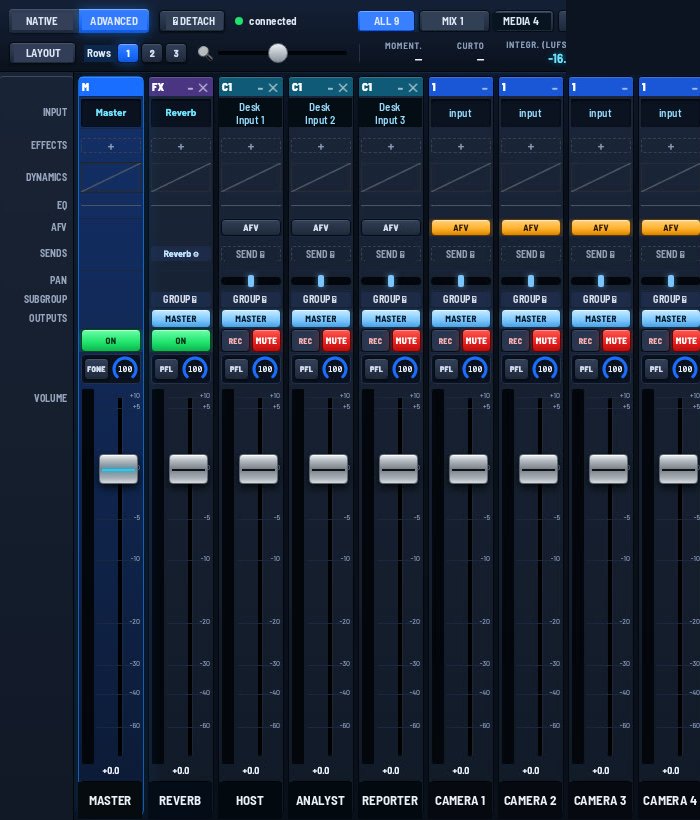
In the NWK mixer each channel strip has an AFV button. With AFV lit, when the input goes to PGM the channel is ON; when the input leaves, the channel is MUTE. With AFV off, the sound stays the way you leave it, on air or not. AFV can also be turned on and off with the Audio follows video box in the FX window. See make audio follow video.
On videos and audio files the button shows AFV 🔒: the audio of media always follows the video. Even so, you can press ON or MUTE by hand partway through. To check a muted channel in the headphones, NWK has PFL on each strip.
Related questions
What does AFV mean on a mixer?
AFV means audio follow video, also written audio follows video. With AFV on, the audio channel of a source opens when the source goes to the program and is muted when the source leaves the program.
Should AFV be on for every camera?
No. Turn AFV on only for sources whose sound belongs to their picture, such as clips and remote guests. If the microphones come from a sound desk and serve every camera, leave AFV off on those channels so that the voice continues while the picture changes.
Why does the sound cut out when I change camera?
The most common cause is AFV turned on in the channel that carries the main microphone. When the picture of that source leaves the program, AFV mutes the channel. Turn AFV off on that channel and the sound will stay on through the cuts.
In the NWK help center
Written and reviewed by the NWK Live Production team (Setor 360 Tecnologia e Eventos Ltda). Published .
NWK has AFV on each mixer channel, and media audio always follows the video.
Try NWK free for 7 days