
Short answer
PFL (pre-fade listen) sends a channel to the headphones taken before the fader, so you hear the channel even with the fader down. AFL (after-fade listen) takes the channel after the fader, at the level it has in the mix. Solo is the general name of the button; on some mixers it means solo in place, which mutes every other channel in the main mix. PFL and AFL change only what the operator hears. Solo in place changes what the audience hears.
On this page
The three side by side
| PFL | AFL | Solo in place | |
|---|---|---|---|
| Where the sound is taken | Before the fader | After the fader | The main mix itself |
| Follows the fader | No | Yes | Yes |
| Heard with the fader down | Yes | No | No |
| Changes what goes on air | No | No | Yes, the other channels are muted |
| Main use | Check a source before opening it | Hear a channel as it sits in the mix | Mixing in a studio, not live |
PFL: hear before opening
PFL takes the signal of the channel before the fader and sends it to a listen bus that feeds only the headphones or the control room speakers. The fader position does not matter. A channel that is closed for the audience can be heard by the operator.
Use PFL to confirm that a microphone is working before the presenter speaks, to find which channel a noise is coming from, to cue a video or a song, and to set the input gain while looking at the meter. During a live show PFL is the button used most, because it answers the question that matters before opening a channel: whether there is good sound there.
AFL: hear the channel as it is in the mix
AFL takes the signal after the fader, and on most mixers after the pan as well. What you hear has the same level and the same position the channel has in the mix. If the fader is down, AFL is silent.
Use AFL to judge how one channel sounds at its real level, with its processing, without the other channels on top. AFL is also the usual listen for group and output buses, where the interest is the result of the mix and not the raw source.
Solo and solo in place
Solo is the name printed on the button of many mixers, and what the button does depends on the mixer. On live consoles the solo button usually sends the channel to the listen bus in PFL or AFL, selected by a switch or in the settings. Nothing changes in the main output.
Solo in place works differently. It mutes all the other channels in the main mix, so that the monitors play only the soloed channel with its pan and effects. In a recording studio that is useful. In a live show it takes everything else off the air. Before pressing solo on an unfamiliar mixer during a show, find out which type it is.
Listening during a live stream
The operator of a live show needs to hear three things without changing the program: what is on air, what is about to go on air, and one channel alone. PFL covers the third. For the first two, the mixer or the streaming program has a headphone selector between program and preview.
Channels that are muted automatically until their picture goes on air are the ones that most need a PFL check. That function is explained in audio follow video (AFV). A remote guest also needs to hear the program without their own voice, which is a different mix: see mix-minus.
PFL in NWK Live Production
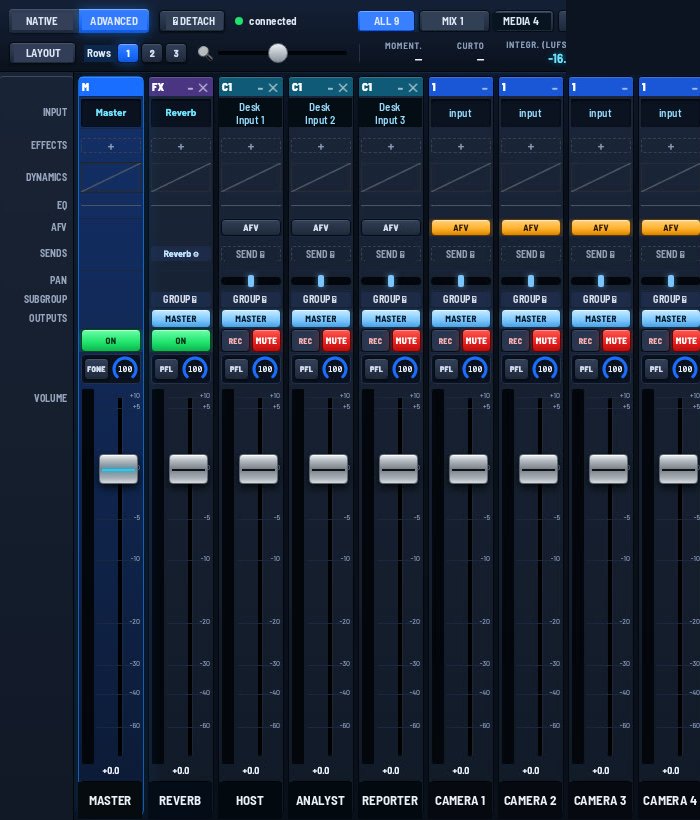
In the NWK mixer each channel strip has a PFL button, which turns yellow when on. You hear the channel in the headphones even with the fader down or the channel muted, and the stream and the recording do not change. Next to the button, a knob from 0 to 100 sets the volume of that channel in the headphones only. See listen to one channel with PFL.
Near the transition buttons, the 🎧 selector chooses what plays in the headphones: PVW, PGM or L and R, with Preview in the left ear and PGM in the right. PFL plays on the PGM side of the headphones. In the mixer, a list next to 🎧 chooses between the Master and one of the outputs A–E for that side. See choose what plays in the headphones.
Related questions
What is the difference between PFL and AFL?
PFL takes the channel before the fader, so the listen level does not depend on the fader and the channel is heard even when it is closed. AFL takes the channel after the fader, so you hear the channel at the level it has in the mix, and a closed fader gives silence.
Does the audience hear the PFL?
No. PFL goes to a separate listen bus that feeds the headphones or the control room speakers. The main output, the stream and the recording do not change.
Is solo the same as PFL?
It depends on the mixer. On many live mixers the solo button is a PFL or AFL listen and does not affect the main output. On mixers with solo in place, pressing solo mutes all the other channels in the main mix, which the audience hears.
In the NWK help center
- Listen to one channel with PFL
- Choose what plays in the headphones
- Hear Preview or Program in the headphones
- Audio mixer overview
Written and reviewed by the NWK Live Production team (Setor 360 Tecnologia e Eventos Ltda). Published .
NWK has PFL on each mixer channel and a headphone selector for Preview, PGM or both.
Try NWK free for 7 days
