
Short answer
Visual radio is the live video stream of a radio show. The sound comes ready from the console of the station, never from the camera microphones, and two or three fixed cameras show the studio. The work is in four points: take the right output of the console, align the sound with the picture, switch cameras without a dedicated operator, and decide what the viewer sees while music and commercials play.
On this page
The sound comes from the console
- Take a program output of the console, the same mix the listener hears, and connect it to an audio interface on the computer that streams.
- Take the output before the transmission delay and before the final processing of the transmitter, if the station uses them. Processing made for the radio signal sounds heavy on a video platform.
- Do not use the camera microphones. They pick up the room, not the voice.
- Set the level once, with the loudest part of a normal show, and leave headroom.
Align sound and picture
The sound of the console reaches the computer almost at once. The picture of each camera takes longer, because the camera and the capture device process the frames. Without correction, the voice comes before the lips. The fix is to delay the audio in the streaming program until a clap in front of the camera sounds at the moment the hands meet. The method is in fixing lip sync.
Cameras without a camera crew
| Camera | What it shows |
|---|---|
| Wide shot of the studio | The safe shot. It works for any moment, including when nobody is switching |
| Host | Fixed close shot, framed for the usual chair |
| Guest position | Fixed shot of the chair of the guest, a little wider to fit different people |
Fix the cameras to the wall or to the ceiling, with mains power and manual exposure.
Who switches is the real question. The board operator can do it with a few large keys, one per camera, if the show is calm. In a busy show, leave the wide shot on and switch only in interviews.
Music, commercials and silence on screen
A radio show has long stretches with nobody speaking. Decide what the screen shows in each one: the wide shot of the studio, a card with the name of the show and of the station, or a video prepared for the break. Music on video platforms is treated differently from music on the radio: a song that the station is licensed to broadcast can still be muted or blocked on the platform. Ask the rights organization of your country and read the rules of the platform. The radio license itself has its own conditions; consult the regulator if the video changes what the station distributes. This page is not legal advice.
What NWK has for visual radio
NWK Live Production is a live production program for Mac with Apple Silicon. For a radio studio, four of its resources matter most:
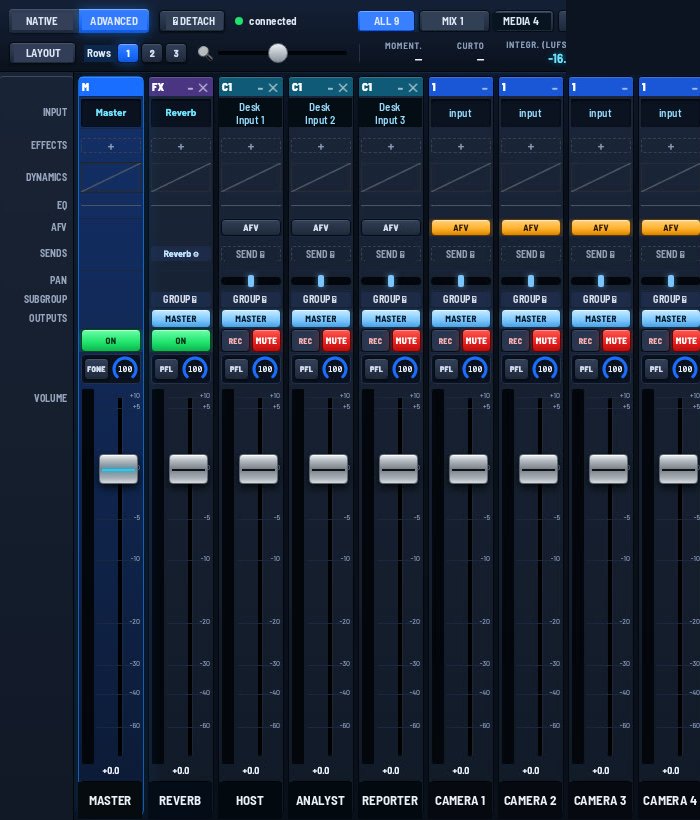
- Mixer. The channel of the console has gain, delay, EQ and dynamics, and the Master shows loudness in LUFS. The delay of a channel goes from 0 to 900 ms, which is the adjustment that aligns the sound with the cameras.
- AFV. With AFV off, the sound of the console stays on whatever camera is on air.
- Operators. The audio operator opens the full mixer in the browser of a tablet or another computer, with a PIN, on the local network or over the internet.
- Triggers. A trigger runs a function when something happens: when the camera of the guest goes on air, the title with the name enters on Overlay 1. There are also events for when the stream starts and for when the Master stays silent for a time you choose.
Keyboard shortcuts and a Stream Deck connected by USB give the board operator one key per camera. NWK is sold by subscription, with a 7-day free trial; see the pricing page.
Related questions
Can the host switch the cameras alone?
Yes, if switching is reduced to one key per camera and the wide shot is the default. In interviews and busy shows, give the keys to the board operator or leave the wide shot on.
Why is the voice ahead of the lips in my visual radio stream?
The sound of the console arrives at the computer faster than the picture of the cameras. Delay the audio channel in the streaming program until a clap looks and sounds together.
What should the video show while a song plays?
Something chosen on purpose: the wide shot of the studio, a card with the name of the show, or a prepared video. Before streaming songs on video, check the rules of the platform and the rights organization of your country.
In the NWK help center
- Audio mixer overview
- Make audio follow video (AFV)
- Audio operator
- Triggers
- Adjust gain, balance and delay
Written and reviewed by the NWK Live Production team (Setor 360 Tecnologia e Eventos Ltda). Published .
NWK has a full audio mixer with delay per channel, AFV, browser operators and triggers in one program for Mac.
Try NWK free for 7 days


