
Short answer
A video podcast holds up when each episode costs few hours. Keep the set ready between sessions, cut the cameras during the conversation as if the episode were live, and record the cut program together with each camera and each microphone. One session then yields the full episode, the audio version and the short clips, and the separate files exist only to fix what went wrong.
On this page
Where the hours of an episode go
| Stage | What takes time | How to shorten it |
|---|---|---|
| Before | Setting up cameras, microphones and light every time | A set that stays assembled and a saved setup in the program |
| Recording | Retakes, technical stops | A sound test with each guest and a fixed opening routine |
| After | Editing camera by camera in a video editor | A live cut during the conversation, so the recorded program is almost the episode |
| Publishing | Exporting versions for each platform | Horizontal and vertical versions recorded in the same session |
The largest saving is in the third row. An hour of conversation edited from three cameras costs several hours in an editor. The same hour cut live costs the hour itself, plus the fixes.
A set that stays ready
- Leave cameras, microphones and lights in place, with marks on the floor and on the table for the chairs and the microphone arms.
- Give each person a microphone close to the mouth. Listeners forgive an average picture and abandon bad sound.
- Lock exposure and white balance on every camera, so that episodes recorded on different days match.
- Keep a wide shot with everyone in it. The wide shot is where the cut goes when two people talk at once.
- Use the same opening, the same titles and the same frame layout in every episode. Repetition is the visual identity of the show.
The step-by-step setup of cameras, microphones and the three recordings is in video podcast with multitrack audio.
One session, several products
Plan the products before recording, because each one asks something of the session.
- The full episode is the cut program, with titles and the mix.
- The audio version for podcast platforms comes from the same mix. Describe aloud what is shown on screen, for those who only listen.
- Short vertical clips need the people framed with room for an upright crop. Check the crop while recording, not afterwards.
- A live episode gains the chat and loses the retakes. Decide per episode; a recorded season can have live specials.
Guests and the calendar
Recording two or three episodes on the same day uses one setup and one sound check for all of them. Send guests a short note beforehand: arrival time, duration, what not to wear when the set has a pattern or a colored background, and a request for headphones when the guest joins remotely. A remote guest needs a test call on the day before, on the same connection and the same device.
Name the files and folders by episode number on the day of the recording. An archive that can be searched is what allows clips and reruns months later.
Where NWK Live Production fits
NWK Live Production is a live production program for Mac. For the routine of a podcast, these documented features apply.
- The set in the program: a preset keeps a ready setup, such as Podcast, and applying it does not change the preset. The ready-made templates window has a Podcast tab, filtered by number of people.
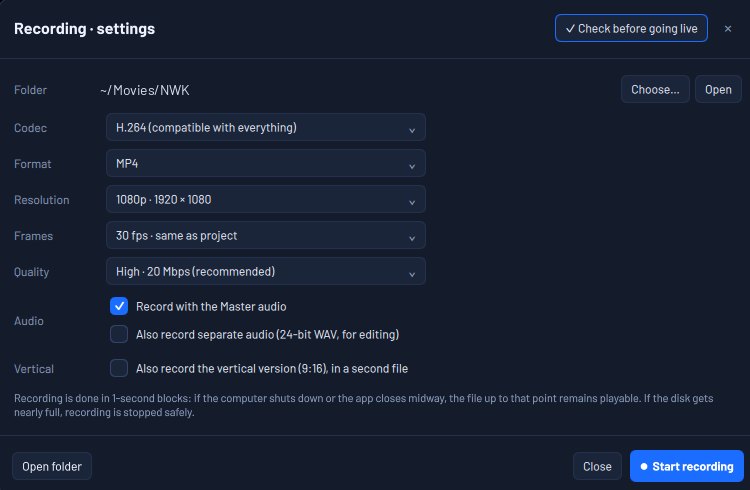
- Three recordings together: the Program, each camera as a clean file and each mixer channel as a WAV file have their own buttons and can run at the same time.
- Vertical in the same session: NWK can record a second, upright 9:16 file with a crop of the Program that you position on screen.
- Remote guest: the CALL input brings a guest in by a link opened in a browser.
- Recorded or live: recording and streaming are separate, so the same setup serves both.
The mix after the session is covered in mixing a multitrack recording. NWK is sold by subscription, with a 7-day free trial. See the pricing page.
Related questions
Is it better to record a video podcast or to stream it live?
Recording allows retakes and a calmer guest. Streaming live brings the audience into the chat and removes the editing stage. A show can record the regular season and stream special episodes. The same set and the same cut serve both.
How many people does it take to produce a video podcast?
One person can cut the cameras and watch the sound in a conversation with two or three people, if the set is ready and the microphones are tested. A second person for the sound helps with four or more voices or with a remote guest.
How do I get short clips out of a long episode?
Mark the time of the good moments during the recording, frame the people so that an upright crop works and, if the program allows it, record a vertical version in the same session. The separate camera files let you recut a clip without the titles.
In the NWK help center
- Use presets as a starting point
- Record each camera to a separate file
- Record each channel to a separate file (multitrack)
- Also record the vertical version
- Put a remote guest on air with CALL
Written and reviewed by the NWK Live Production team (Setor 360 Tecnologia e Eventos Ltda). Published .
NWK records the Program, each camera, each audio channel and a vertical version in the same session, on Mac.
Try NWK free for 7 days


