Short answer
Have the guest join through a link in the browser, wearing headphones, on a stable connection. Send the guest the program sound without their own voice, so that there is no echo. Show host and guest side by side during the conversation and one at a time in long answers. Test the day before, with the same device, the same network and the same place the guest will use.

On this page
Step by step
- Send the guest the list of requests: headphones, stable internet, light in front, camera at eye level.
- Create the guest's input and send the link.
- Run a test the day before, with the same device, network and place.
- Confirm that the guest hears the studio without hearing their own voice.
- Prepare the side-by-side layout and the title with the guest's name.
- On the day, bring the guest in fifteen minutes early and keep them off air until the introduction.
- Keep the guest's phone number at hand and agree on what happens if the connection drops.
What to ask of the guest
| Request | Why |
|---|---|
| Headphones | Without headphones, the studio sound leaves the guest's loudspeaker, enters the guest's microphone and returns as echo |
| Cable or strong Wi-Fi, close to the router | A weak connection freezes the picture and breaks the voice |
| Light in front, not a window behind | With the window behind, the face becomes a silhouette |
| Camera at eye level | A laptop on the table looks at the guest from below |
| A quiet room, phone notifications off | The guest's microphone picks up everything |
Send the list in writing, a few days before, together with the time of the test.
How the guest joins
The simplest path for the guest is a link that opens in the browser, with nothing to install. In NWK that is the CALL input: you send a link, the guest opens it on a phone or computer, allows the camera and the microphone, and appears as an input that goes on air like any camera. The page on remote guests by link describes what the guest sees and the options of the input.
Check the link before each event and send it again if it changed.
What the guest hears
The guest needs to hear the host and everything else that is on air, except their own voice. When the guest's voice goes back to the guest, it arrives late and the guest stops talking, or it turns into echo for the audience. The mix that solves this is called mix-minus.
In NWK the guest who joins by CALL already receives the Program and the studio sound without their own voice. In the settings of the input you can change what the guest sees and what the guest hears. If the studio listens to the guest through a loudspeaker instead of headphones, the host's microphone picks up the guest, and the echo cancellation of the channel removes that sound. For setups with more than one guest or with an outside call, see how to set up the mix-minus.
Host and guest on screen
| Composition | When to use |
|---|---|
| Side by side | Introduction and quick exchanges. The audience sees who listens |
| Guest alone | Answers longer than a few sentences |
| Host alone | Long questions, opening and closing |
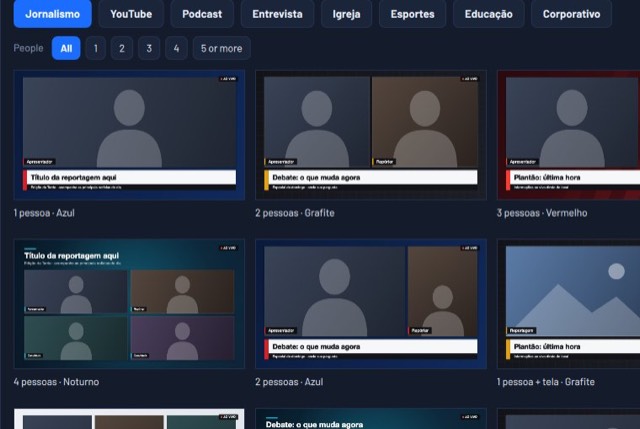
NWK has ready-made templates in an Interview tab, with a filter by number of people. In each space you choose the camera or the CALL that appears there. A title with name and role identifies the guest; put it on when the guest first speaks and again from time to time.
Talking with a delay
There is always a delay between the studio and the guest. In a normal conversation people confirm with short sounds while the other speaks; with a delay, those sounds arrive in the middle of the next sentence and the two interrupt each other. Ask complete questions, leave a pause after each answer and nod instead of speaking while the guest talks. Agree on a hand signal for wrapping up.
When the connection fails
- Have the guest's phone number and a second person to call while the host continues.
- Prepare a subject that the host can develop alone for two minutes.
- If the picture freezes and the voice continues, stay on the host's camera and go on with the conversation.
- If the guest drops, say so on air, move on, and bring the guest back when the picture has been stable for some seconds.
Related questions
Does the guest need to install anything?
Not when the guest joins through a link in the browser. The guest opens the link on a phone or computer, allows the camera and the microphone and types a name.
Why does the audience hear an echo when the guest speaks?
Either the guest is without headphones and the studio sound returns through the guest's microphone, or the guest is receiving a mix that includes their own voice. Ask for headphones and send the guest a mix without their own voice.
Can the guest join from a phone?
Yes. Ask the guest to rest the phone on something steady, at eye level, and to use headphones. In NWK the guest's screen has a button that fills the 16:9 frame when the phone is held upright.
In the NWK help center
- Put a remote guest on air with CALL
- Start with a ready-made template
- Create a title or lower third
- Cancel speaker echo
Written and reviewed by the NWK Live Production team (Setor 360 Tecnologia e Eventos Ltda). Published .
NWK brings the guest in through a link and returns the program without the guest's own voice.
Try NWK free for 7 days