Short answer
A university stream has three typical formats. A lecture needs readable slides and a clear voice. A thesis defense needs every committee member heard, including the one who joins remotely. A graduation needs names on screen and a recording that survives three hours. Build one saved setup per format, so that a different operator can run each event the same way.

On this page
Three events, three sets of needs
| Event | What the remote viewer needs | Minimum setup |
|---|---|---|
| Lecture or talk | To read the slides and hear the speaker | One camera, the slides as a direct signal from the computer, one microphone on the speaker |
| Thesis defense | To hear the candidate and every committee member | One wide camera, the slides, one microphone for the candidate and one for the table, a return path for the remote member |
| Graduation | To see each graduate and read the name | Two or three cameras, a feed from the sound desk, name titles, a long recording |
The slides are the content of a lecture. Take them as a signal from the presenter's computer instead of pointing a camera at the projection screen. The page on slides and camera together shows how to combine the two on screen.
The difficulties that are specific to a campus
- Staff that changes every term. Interns and student workers rotate. A setup that lives in one person's head is lost when that person graduates. Write the procedure on one page and save the setup itself.
- Rooms you do not control. Each auditorium has its own projector, sound desk and cable paths. Visit the room with the equipment before the event day.
- The campus network. Institutional networks often filter outbound traffic. Test the stream from that room, on that network, days ahead, and ask the IT department for a wired port.
- Audio from the room system. In an auditorium, ask the sound technician for a feed from the desk instead of capturing the loudspeakers with a camera microphone.
- Long ceremonies. A graduation runs for hours. Keep the computer on mains power, check the free disk space and rehearse for the full length.
The defense with a remote committee member
The remote member must hear the room and be heard by the room, without hearing their own voice come back. That return without the guest's own voice is called mix-minus. Decide before the day which of two models you will use.
- The member enters the production. The remote member becomes one more source, with picture and sound, and receives the program back. The page on an interview with a remote guest covers the setup.
- The production enters the meeting. The defense happens inside the institution's meeting platform, and the production is the room's camera and microphone in that meeting.
In both models, test with the remote member the day before, on the connection that person will use.
Recording, access and rights
Decide before the event who can watch and for how long the recording stays available. A defense may contain unpublished results, and the candidate or the advisor may ask for a closed session. A lecture may show third-party material on the slides. Follow the institution's policy for image and for recordings. Graduation ceremonies usually have music: for the rules on music in a stream, consult the rights organization of your country.
Where NWK Live Production fits
NWK Live Production is a live production program for Mac. These documented features answer the difficulties above.
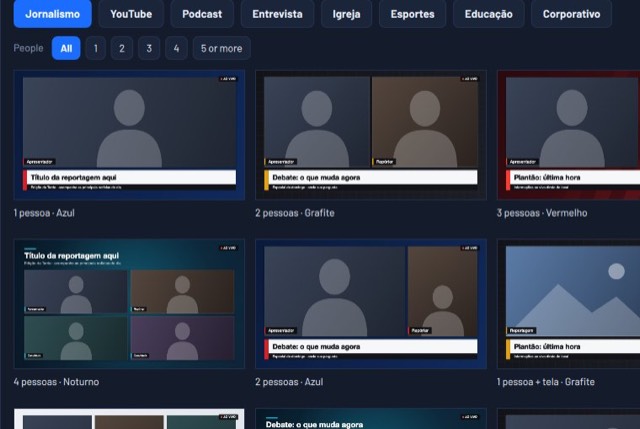
- Rotating staff: a preset keeps a ready setup, such as Lecture or Defense, and applying the preset does not change it. The window of ready-made templates has an Education tab.
- Remote member: the CALL input sends a link that the guest opens in a browser, with nothing to install. The guest gets the Program back and the studio sound without their own voice.
- Defense inside a meeting: NWK can be the camera and microphone in Zoom, Microsoft Teams or Google Meet, with the sound through the virtual microphone and the picture through NDI®.
- Graduate names: a title can read a Google Sheet or a CSV file and step from one row to the next.
- Archive: recording and streaming are separate, and the recording is written in one-second blocks, so the file stays playable up to the point where a power cut happened.
NWK is sold by subscription, with a 7-day free trial. See the pricing page.
Related questions
How many cameras does a lecture stream need?
One camera on the speaker is enough when the slides arrive as a separate signal from the presenter's computer. A second, wide camera helps in question sessions, when the audience speaks.
How do I include a remote committee member in a thesis defense?
Either bring the member into the production as a remote guest, with a return that does not include the member's own voice, or hold the defense inside a meeting platform and connect the room's camera and microphones to that meeting. Test the day before with the member's real connection.
Should a graduation be streamed publicly or privately?
That is the institution's decision. Many families watch from far away, which favors an open link, but the image policy of the institution and the wishes of the graduates come first. Set the visibility on the platform before the ceremony starts.
In the NWK help center
- Put a remote guest on air with CALL
- Use NWK in Zoom, Teams or Meet
- Pull live data into a title
- Use presets as a starting point
- Record the Program
Written and reviewed by the NWK Live Production team (Setor 360 Tecnologia e Eventos Ltda). Published .
NWK keeps a setup as a preset, brings a remote guest in by link and reads names for titles from a spreadsheet, on Mac.
Try NWK free for 7 days