
Short answer
A codec is the method that compresses video or audio: H.264, HEVC (H.265) and AV1 for video, AAC for audio. A container is the file format that holds the compressed video and audio together with their timing: MP4, MOV, MKV. An MP4 file usually carries H.264 video and AAC audio, but the same MP4 can carry HEVC, and the same H.264 can travel inside a MOV or with no file at all, in a live stream.
On this page
What the codec does
Uncompressed video is too large to store or send. The codec is the method that shrinks it: the encoder turns pictures into compressed data, and the decoder in the player turns the data back into pictures. The name comes from coder and decoder.
The codec decides how good the picture looks at a given bitrate, how much work the computer does to encode, and which devices can play the result. H.264 plays practically everywhere. HEVC, also called H.265, reaches similar quality with less data and is not opened by every older device or editor. Audio has its own codecs, such as AAC.
What the container does
The container is the wrapper. The container stores the video track, one or more audio tracks, the timing that keeps them in sync and information such as duration. The container does not compress anything and does not change the quality.
| It is a codec | It is a container |
|---|---|
| H.264 (AVC) | MP4 (.mp4) |
| HEVC (H.265) | MOV (.mov), the QuickTime format |
| AV1 | MKV (.mkv) |
| AAC, MP3 (audio) | WAV (.wav), for audio |
The file extension names the container. The extension does not say which codec is inside.
Why the difference matters
- A file that does not open. When an editor or a television refuses an .mp4, the cause is usually the codec inside it, not the container. An MP4 with HEVC fails on a device that only decodes H.264.
- Changing the container is quick. When the new container accepts the codec, moving the same video from MOV to MP4 copies the data into a new wrapper, quickly and with no loss.
- Changing the codec is a new encode. Going from HEVC to H.264 means decoding and compressing again. It takes time and loses a little quality.
- Asking for the right thing. “Send me an MP4” is incomplete. “H.264 in MP4” says what the other side needs to know.
How the encoder spends the bitrate, constant or variable, is a third and separate choice. See CBR or VBR for streaming.
In a live stream there is no file
A live stream uses the same codecs, but there is no file to open. The protocol, such as RTMP or SRT, carries the compressed video and audio to the platform in its own packaging. What the platform tells you to configure is the codec. YouTube, for example, accepts H.264, H.265 (HEVC) or AV1 for video and AAC or MP3 for audio in live ingestion.
The recording you make of the same show is a separate encode, with its own codec and its own container.
Codec and format in NWK Live Production
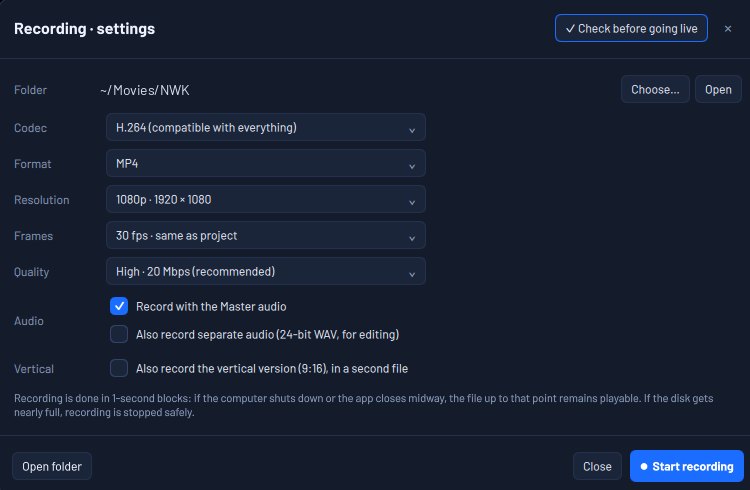
The recording settings of NWK Live Production have the two choices in separate fields. Codec: H.264, which the program labels as compatible with everything, or HEVC / H.265, labeled as half the size. Format: MP4 or MOV. The help recommends H.264, MP4 and High quality for most cases, and HEVC when you want smaller files and your video editor opens HEVC. See recording settings.
The separate audio is another container: a WAV file with the same name as the video. NWK records in blocks of one second, so if the computer shuts down in the middle, the file up to that point still plays. See recording if the computer shuts down. Recording each camera to its own file is explained in What ISO recording means in video.
Related questions
Is MP4 the same as H.264?
No. MP4 is a container, the file that holds the tracks. H.264 is a codec, the method that compresses the video. Most MP4 files contain H.264 video, which is why the two names get mixed, but an MP4 can also contain HEVC or AV1.
What is the difference between MP4 and MOV?
Both are containers and both can carry the same codecs. MOV is the QuickTime format created by Apple, and MP4 is the international standard that was based on it. With the same codec and bitrate inside, the picture quality is identical.
Should I record in H.264 or HEVC?
Record in H.264 when the file has to open everywhere without questions. Record in HEVC when you want smaller files at similar quality and you have confirmed that your editor and the people who receive the file can open HEVC.
In the NWK help center
Sources and references
Written and reviewed by the NWK Live Production team (Setor 360 Tecnologia e Eventos Ltda). Published .
NWK records the Program in H.264 or HEVC, as MP4 or MOV, in one-second blocks.
Try NWK free for 7 days
