Short answer
In video production, ISO is short for isolated. An ISO recording keeps the picture of each camera in its own file, at the same time as the switched program is recorded or streamed. After the event you have every angle for the whole duration and can cut the show again. This ISO has nothing to do with the ISO setting of a photo camera, which is sensor sensitivity.
On this page
ISO recording and program recording
A live production has one output that the audience sees, the program, made of the cuts between cameras. The program recording keeps only what was chosen at each moment. If the director was on camera 2, the picture of cameras 1 and 3 at that moment is gone.
The ISO recording keeps the cameras themselves. Each camera is isolated in its own file, whole, whether or not it was on air.
| Program recording | ISO recording | |
|---|---|---|
| What it keeps | The switched show, as it went on air | Each camera, from start to finish |
| Graphics | With titles, scoreboard and overlays | Usually the clean picture, without graphics |
| Files | One | One per camera |
| Ready to publish | Yes | No, it is material for editing |
What ISO recordings are for
- Fixing a wrong or late cut in the edited version.
- Making a new edit with another rhythm, for example a short version or a highlights reel.
- Making clips for social networks from the best angle, without the graphics of the live show.
- Keeping a safety copy of every camera.
ISO recording is not the same as instant replay. Replay plays a moment back during the show; ISO files are for after the event. See what instant replay is.
What ISO recording costs
Each camera is one more file being written at the same time. Disk use is multiplied by the number of cameras, and the disk has to keep up with all of them at once. Use a fast disk and check the free space before the event.
The files only help in the edit if they line up. ISO files that start at the same instant, or that carry the same timecode, can be stacked on the timeline of the video editor without syncing each one by hand.
The audio is a separate matter. ISO refers to the cameras; the equivalent for sound is multitrack recording, one file per mixer channel. The file settings for multitrack audio are explained in sample rate, bit depth and 32-bit float.
The other ISO: camera sensitivity
On a photo or video camera, ISO is the sensitivity setting. A higher ISO makes the image brighter and adds noise. The name comes from the International Organization for Standardization, which publishes the standard for that scale.
The two terms meet in the same production: the camera operator sets the ISO of the camera, and the director asks whether the ISOs are recording. In the first sentence ISO is exposure; in the second it is the isolated recordings.
ISO recording in NWK Live Production
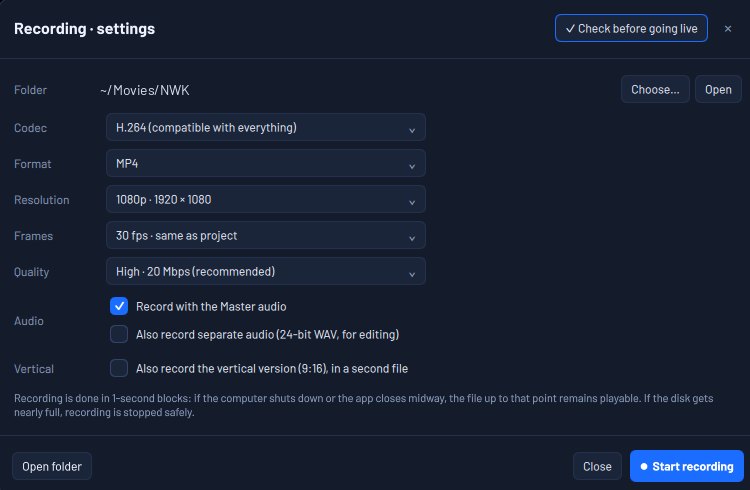
In NWK, the “⏺ ISO” button at the top of the window opens the MultiCorder (per-camera recording). You choose the inputs, and each selected input becomes its own file with the clean image, without overlays. The files all start together and carry the Master audio. They use the same format (MP4 or MOV) and the same quality chosen in the recording settings. The steps are in record each camera to a separate file.
The MultiCorder has its own button: it can run together with the program recording or on its own. To keep the sound of each channel as well, NWK has multitrack recording, with one WAV file per mixer channel.
Related questions
What does ISO stand for in video production?
ISO is short for isolated. An ISO recording, or ISO feed, is the picture of one camera kept separate from the switched program, usually without graphics.
Is ISO recording the same as the ISO setting of a camera?
No. ISO recording is the recording of each camera to its own file during a multicamera production. The ISO setting of a camera is sensor sensitivity, which changes the brightness and the noise of the image.
Do I need ISO recording if I already record the program?
Only if the event will be edited afterwards. The program recording is enough to publish the show as it went on air. ISO recordings are needed to change cuts, build another version or take clips without graphics.
In the NWK help center
- Record each camera to a separate file
- Record each channel to a separate file (multitrack)
- Multitrack recording overview
Written and reviewed by the NWK Live Production team (Setor 360 Tecnologia e Eventos Ltda). Published .
NWK records the program, each camera to its own file and each audio channel to its own WAV.
Try NWK free for 7 days