
Short answer
An audio mixer inside the streaming program lets you treat each microphone as a separate channel, with its own level, EQ and dynamics, instead of receiving one finished stereo signal from the room's console. It solves three common problems: a stream mix that is a copy of the room mix, sound that does not follow the camera on air, and remote guests who hear themselves. NWK Live Production has a full mixer of this kind.
On this page
The problem with one stereo cable
The usual setup takes two channels from the room's console into the computer. The streaming program receives a mix that was made for the loudspeakers of the room. What is right for the room is often wrong for the stream: loud instruments on stage need little reinforcement in the room and end up low in the stream, and the audience at home hears no ambience.
With a single stereo signal, the streaming operator can only change the overall volume. A microphone that is too low stays too low.
What a mixer inside the program solves
| Need | What the mixer does |
|---|---|
| A mix made for the stream | Each microphone arrives as its own channel, from a multichannel audio interface, and is balanced for the people watching at home. |
| Sound that follows the picture | The audio of a camera or video opens when that source goes on air and closes when it leaves. See audio follows video. |
| Remote guests without echo | A separate output sends the guest everything except the guest's own voice. See mix-minus. |
| A steady level | Compressor and limiter on the channels and on the master, and a loudness meter to compare with the level the platform asks for. See dBFS, dBu and LUFS. |
| Mixing after the event | Each channel recorded in its own file. |
| Checking before opening | Listening to a channel in the headphones without putting it on air. |
When an external console is still the right choice
The mixer in the program does not replace the console that feeds the loudspeakers of a large room, with stage monitors and a sound engineer at the desk. In that case the two work together: the console sends its channels to the computer through an audio interface or, on consoles that have one, through their own USB audio connection, and the stream is mixed in the program. For a podcast, a small studio or an event with a few microphones, the mixer in the program can be the only one.
The mixer in NWK Live Production
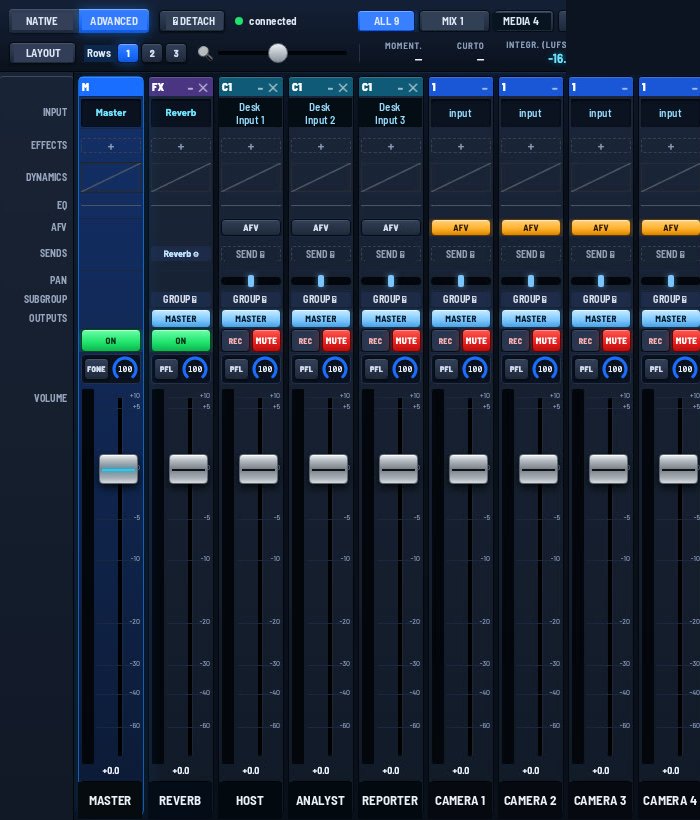
The audio page lists the processing on each channel: EQ, gate, compressor, limiter, automatic level, noise reduction and echo cancellation. What matters for the workflow:
- Two views of the same console. The Native mixer is simple and fits in a small space. The Advanced mixer shows the full console in rows. Switching from one to the other does not change the sound.
- Channels from the audio interface. Build the mixer creates one channel for each input of the interface, as on a sound desk. See build the mixer from the audio interface.
- AFV on each strip. With AFV on, the channel turns ON when the input goes to Program and is muted when it leaves.
- Outputs A to E. Each output is a mix of its own, for the stage monitor, a guest's headphones or a call. The stream and the recording always receive the Master.
- PFL. You hear a channel in the headphones without changing what goes on air.
- Loudness in LUFS. The Master has a loudness meter with momentary, short-term and integrated readings.
- Multitrack recording. Each channel of the mixer goes to its own WAV file, all aligned.
Someone else on the audio
One person cutting cameras and mixing audio at the same time does both jobs worse. In NWK the Advanced mixer is the same one the audio operator opens in a browser, on another computer or on a tablet, with a PIN. What one person changes, the other sees right away. The operator can listen to the mix on headphones from where they are. See the audio operator.
Related questions
Do I still need an audio interface if the program has a mixer?
Yes, to bring microphones into the computer. The mixer in the program processes and mixes the channels, and the audio interface is what converts the microphones into those channels. A USB microphone or a camera with audio also arrives as a channel.
Does the stream receive the same mix as the monitor outputs?
In NWK Live Production, no. The stream and the recording always receive the Master. Outputs A to E are separate mixes, and you choose channel by channel what goes to each one.
Can another person mix the audio from a tablet?
Yes. In NWK Live Production the audio operator opens the mixer in the browser of another computer or a tablet, on the local network or over the internet, types a PIN and works on the same mixer you see in the program.
In the NWK help center
- Audio mixer overview: tabs and strips
- Native or Advanced mixer
- Build the mixer from the audio interface
- Run the audio from another computer or tablet
- Record each channel (multitrack)
Written and reviewed by the NWK Live Production team (Setor 360 Tecnologia e Eventos Ltda). Published .
NWK Live Production has a full audio mixer inside the program, with outputs A to E, loudness in LUFS and an audio operator in the browser.
Try NWK free for 7 days
