
Short answer
Apple Silicon chips include a media engine: circuits inside the chip made only to encode and decode video. In the technical specifications of current Macs, Apple lists hardware-accelerated H.264, HEVC, ProRes and ProRes RAW, video encode and decode engines, and AV1 decode. What changes from chip to chip is the number of engines. Whether a program uses them is a decision of each program.
On this page
What Apple lists
The technical specifications page of each Mac has a Media Engine section. Two pages opened for this guide show how the list changes with the chip:
| Mac and chip | Video decode | Video encode | ProRes encode and decode |
|---|---|---|---|
| MacBook Air 13-inch, M4 | One engine | One engine | One engine |
| Mac Studio (2025), M4 Max | One engine | Two engines | Two engines |
| Mac Studio (2025), M3 Ultra | Two engines | Four engines | Four engines |
The three chips carry the same line of codecs: hardware-accelerated H.264, HEVC, ProRes and ProRes RAW, plus AV1 decode. For any other Mac, read the page of that exact model. The list is not the same on every chip.
What this means for a live production
- The stream and the recording are encodes. H.264 is the codec that streaming platforms accept everywhere, and HEVC is common for recording. Both are in the hardware list.
- Compressed sources are decodes. A video file, a network source and a remote guest arrive compressed and have to be decoded before they can be mixed.
- AV1 is listed for decode only. On these Macs, sending AV1 means encoding in software, on the processor. The choice between the three codecs is in H.264, HEVC or AV1 for streaming.
- The processor stays free for the rest. When the dedicated circuit compresses the video, the processor cores are left for cameras, graphics and audio. The trade-off between the two kinds of encoder is explained in hardware or software encoding.
What the specifications do not say
Apple publishes the number of engines. Apple does not publish, in those specifications, how many streams each engine encodes at the same time, at which resolution or with which quality. More engines mean more encoding work done in parallel, and the exact number of simultaneous outputs for your production has to come from a test, not from the table.
The specifications also describe the chip, not the programs. Each program decides whether it sends the video to the media engine or encodes on the processor, and some programs let you choose. Look in the encoder settings for an option marked as hardware.
How to check your Mac
- Open the Apple menu and choose About This Mac to see the name of the chip.
- On the Apple Support site, open the technical specifications of your exact model and read the Media Engine section.
- Open your production with everything it will have at the event, start the stream to a private destination and the recording, and watch the processor use.
In NWK Live Production
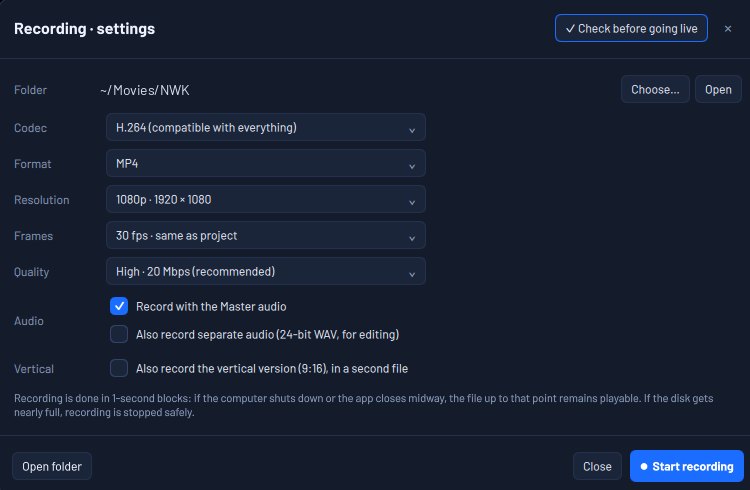
NWK Live Production runs on a Mac with Apple Silicon (M1 or newer) and macOS 14 or later. The recording offers the codec H.264 (compatible with everything) or HEVC / H.265 (half the size), in MP4 or MOV, with quality Good at 12 Mbps, High at 20 Mbps (recommended) or Maximum at 40 Mbps. See recording settings.
Each destination has its own resolution, frames per second and bitrate, and destinations with the same quality share one encoder, so sending the same video to several platforms puts no extra load on the computer. See quality per destination.
Related questions
Do all Apple Silicon Macs have a hardware video encoder?
Apple lists a media engine with hardware-accelerated H.264 and HEVC in the technical specifications of the Macs opened for this guide, from a MacBook Air with M4 to a Mac Studio with M3 Ultra. For any other model, the Media Engine section of that model's specifications page is the answer.
Can a Mac encode AV1 in hardware for streaming?
In the specifications opened for this guide, Apple lists AV1 decode and does not list AV1 encode. On those Macs, an AV1 stream is encoded in software, which uses the processor. H.264 and HEVC are in the hardware list.
Does a chip with more encode engines give a better picture?
The number of engines describes how much encoding work the chip does in parallel, not the quality of each stream. Quality depends on the codec, the bitrate and the settings the program uses.
In the NWK help center
Sources and references
- Apple Support: MacBook Air (13-inch, M4, 2025) technical specifications, Media Engine
- Apple Support: Mac Studio (2025) technical specifications, Media Engine
Written and reviewed by the NWK Live Production team (Setor 360 Tecnologia e Eventos Ltda). Published .
NWK runs on Mac with Apple Silicon and records in H.264 or HEVC, with frames out, lost frames, CPU and memory on the main screen.
Try NWK free for 7 days
