
Short answer
For a live production on one computer, hardware encoding is usually the safer choice: a dedicated circuit of the video chip compresses the video and the processor stays free for cameras, graphics and audio. Software encoding runs on the processor and, with a slow preset, gives a slightly cleaner picture at the same bitrate, at the cost of a heavy and variable load. At the bitrates the platforms recommend, the difference in picture is small; an overloaded processor that skips frames is a much bigger problem.
On this page
What each one is
Encoding is compressing the video into a codec such as H.264 before sending or recording it. The same codec can be produced in two ways.
- Software encoding. The encoder is a program that runs on the processor (CPU), next to everything else the computer is doing.
- Hardware encoding. A circuit made only for this job, inside the graphics chip or the processor's integrated graphics, does the compression. The program hands the frames to the circuit and receives the compressed video back.
The difference in practice
| Hardware | Software | |
|---|---|---|
| Load on the processor | Low | High, and it rises with movement in the picture |
| Speed | Steady, made for real time | Depends on the preset and on how free the processor is |
| Quality at the same bitrate | Good; depends on the generation of the chip | Can be better with slow presets |
| Codecs | Only the ones the chip supports | Any codec the program includes |
In software, the preset trades speed for compression. A slower preset analyzes the picture more and gives a cleaner result at the same bitrate, and uses much more processor. A fast preset is light and compresses worse.
When the difference in quality shows
The picture difference between the two grows as the bitrate falls. With a bitrate near the top of the range the platform publishes, both look clean and the audience does not see which one was used. With a low bitrate, a weak upload or a lot of movement, a slow software preset holds detail a little longer before the picture breaks into blocks.
The platform encodes the stream again for the audience, which narrows the difference further. YouTube's encoder settings page asks for the codec, the bitrate, constant bitrate (CBR) and a keyframe every 2 seconds. Both kinds of encoder meet these requirements.
The risk that matters: skipped frames
A live encoder has the time of one frame to finish each frame. When the processor is busy with cameras, effects, graphics and a software encoder at the same time, the encoder falls behind and frames are skipped. The audience sees a stutter that no bitrate fixes.
Skipped frames come from the computer; dropped frames come from the network. The difference is in dropped and skipped frames. Signs that the computer is at the limit, and what to turn down first, are in High CPU and a hot Mac during a live stream.
How to choose
| Situation | Recommendation |
|---|---|
| One computer mixes, records and streams | Hardware |
| Laptop, or a warm room | Hardware |
| Powerful desktop with processor to spare, low bitrate | Software with a medium preset, tested beforehand |
| A codec the video chip does not support | Software, or change the codec. See H.264, HEVC or AV1 |
Encoding load in NWK Live Production
In NWK Live Production each destination has its own resolution, frames and bitrate, and destinations with the same quality share one encoder, so sending the same video to several platforms puts no extra load on the computer. When the computer is near its limit, keeping the destinations at the same quality is the lightest setup. See quality per destination.
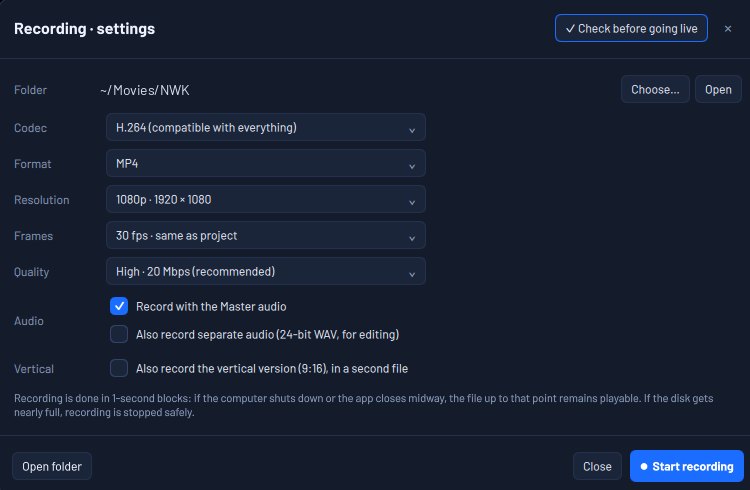
The recording has its own settings: codec H.264 or HEVC / H.265, and quality Good · 12 Mbps, High · 20 Mbps (recommended) or Maximum · 40 Mbps. See recording settings.
Related questions
Is hardware encoding worse quality than software?
At the same bitrate, software encoding with a slow preset can give a slightly cleaner picture, and older video chips are further behind than recent ones. At the bitrates the platforms recommend, the difference is small.
Does hardware encoding use the processor at all?
Very little. The video chip does the compression, and the processor only prepares the frames and handles audio and the network.
Which software preset should I use for streaming?
Start with a fast or medium preset and test with the full production running. Move to a slower preset only if the processor load stays low and no frames are skipped during the fastest scene.
In the NWK help center
Sources and references
Written and reviewed by the NWK Live Production team (Setor 360 Tecnologia e Eventos Ltda). Published .
In NWK, destinations with the same quality share one encoder, so sending to several platforms adds no load to the computer.
Try NWK free for 7 days
