
Short answer
For a live stream sent by RTMP to one or several platforms, use H.264: practically every platform accepts it. HEVC (H.265) and AV1 reach a similar picture with less bitrate, and YouTube publishes lower bitrate ranges for both, but they only work when the platform, the protocol and your encoder all support them. Consider HEVC or AV1 for a single destination that accepts them, when the upload is short or the stream is 4K.
On this page
The three codecs side by side
| Codec | Also called | Strong point | Limit |
|---|---|---|---|
| H.264 | AVC | Accepted by practically every platform and encoder | Needs the most bitrate of the three for the same picture |
| HEVC | H.265 | Similar picture with less bitrate; the codec YouTube indicates for HDR | Not accepted by every platform; more work to encode |
| AV1 | AOMedia Video 1 | Similar picture with less bitrate; a royalty-free format | The most work to encode; accepted in the fewest places |
What the platforms accept
The destination decides first. A codec the platform does not accept gives no picture at all.
- YouTube. The encoder settings page lists H.264, H.265 (HEVC) and AV1 as video codecs for live ingestion. For HDR the page indicates H.265 and states that AV1 is not supported for HDR.
- YouTube, by protocol. The ingestion protocol comparison of the YouTube Live Streaming API lists H.264 for RTMP and RTMPS, and H.264 and HEVC for HLS. The settings page adds that an encoder that does not yet send the newer codecs over RTMP may use HLS.
- Facebook. The Live Video API reference lists H.264 as the video codec, sent by RTMPS.
The protocol counts too. Classic RTMP carries H.264. Enhanced RTMP, maintained by the Veovera Software Organization, adds codecs such as HEVC and AV1 to the protocol, and it only works when the encoder and the platform both implement it. See what RTMP is.
How much bitrate the newer codecs save
YouTube's own table gives a measure. These are the recommended values for live ingestion:
| Resolution and frames | H.264 | AV1 and H.265 |
|---|---|---|
| 1080p at 60 fps | 17 Mbps | 12 Mbps |
| 4K at 60 fps | 50 Mbps | 35 Mbps |
In these rows the newer codecs ask for about 30% less bitrate. The saving matters where bitrate is the limit: a weak upload, a mobile connection, or 4K. With upload to spare, H.264 at the recommended bitrate already looks clean. The complete table is in bitrate table from 720p to 4K.
What the newer codecs cost
- More work to encode. HEVC and AV1 compress more because they analyze the picture more. In real time, that work has to fit in the time of one frame, on top of everything else the computer does during the show.
- One codec for all destinations. When the same encode goes to several platforms, the codec has to be one that all of them accept, and that is H.264.
How to choose
| Situation | Codec |
|---|---|
| Several platforms from one stream | H.264 |
| One destination that accepts HEVC or AV1, with a weak upload | HEVC or AV1, if the encoder keeps up without skipping frames |
| 4K or HDR to YouTube | HEVC |
| Recording for editing | H.264 for compatibility, HEVC for smaller files |
Codecs in NWK Live Production
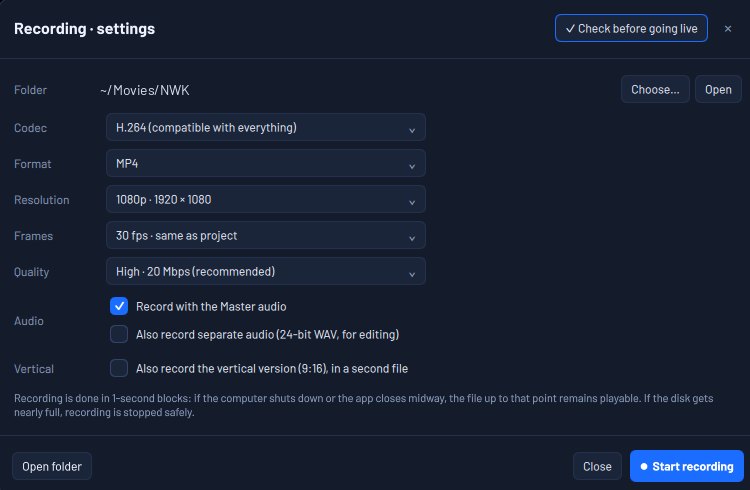
In the recording settings of NWK Live Production, the Codec field offers H.264, described as compatible with everything, or HEVC / H.265, described as half the size. For most cases NWK recommends H.264, MP4 and High quality, and HEVC when you want smaller files and your video editor opens HEVC. See recording settings.
For streaming, each destination has its own resolution, frames and bitrate, and NWK shows the range the bitrate can go for the chosen resolution. See quality per destination.
Related questions
Are HEVC and H.265 the same thing?
Yes. HEVC, High Efficiency Video Coding, and H.265 are two names for the same codec. In the same way, H.264 is also called AVC.
Does YouTube accept AV1 for live streams?
YouTube's encoder settings page lists AV1 as a video codec for live ingestion, next to H.264 and H.265, with lower bitrate ranges than H.264. The same page states that AV1 is not supported for HDR.
Will HEVC make my stream look better than H.264?
At the same bitrate, HEVC usually gives a cleaner picture than H.264, and the difference shows most at low bitrates. With enough bitrate for the resolution, the two look similar after the platform encodes the video again.
In the NWK help center
Sources and references
- YouTube Help: choose live encoder settings, bitrates and resolutions
- YouTube Live Streaming API: ingestion protocol comparison
- Meta for Developers: Live Video API reference, video format
- Veovera Software Organization: Enhanced RTMP
Written and reviewed by the NWK Live Production team (Setor 360 Tecnologia e Eventos Ltda). Published .
In NWK the recording codec is H.264 or HEVC, and each streaming destination has its own resolution, frames and bitrate.
Try NWK free for 7 days

