
Short answer
ISO recording keeps each camera in its own file while the program goes on air, and programs differ on four points: which plan or edition includes it, how many sources can be recorded, what each file carries of picture and sound, and which system the program runs on. In NWK Live Production, for Mac, per-camera recording is in every plan and records the clean picture with the Master audio. In Wirecast, which runs on Mac and Windows, the feature is exclusive to the Pro edition. In Ecamm Live it is exclusive to the Pro plan, with up to three cameras.
On this page
What to compare
- Plan or edition. In some programs ISO recording is only in the higher tier. Compare the price of the tier that has it.
- How many sources, and which kinds. Look for a published limit and for sources that cannot be recorded on their own.
- Clean picture or with graphics. A clean file lets the editor redo titles and overlays.
- The sound in each file. The sound of the source, the final mix or no sound. A sound in common between the files helps to line them up.
- Start and alignment. Files that start together line up by the first frame in the video editor.
- Format and codec. Check that the editing computer opens the files without converting them.
- Load. Each camera is one more file being written. The disk and the computer have to keep up for the whole event.
What ISO recording is and what it is for is in what ISO means in video.
Three programs, side by side
The Wirecast and Ecamm Live columns contain only what their official pages say, checked on November 10, 2026. “Not found” means that the item was not on the pages we checked, not that the feature does not exist.
| Criterion | NWK Live Production | Wirecast | Ecamm Live |
|---|---|---|---|
| Platform | Mac with Apple Silicon. The Windows version is in development and not available | Mac and Windows | Mac. Isolated recording requires Apple Silicon |
| Plan or edition | Every plan | Exclusive to Wirecast Pro. Wirecast Studio records only the main program output | Exclusive to the Pro plan |
| Sources | The inputs you select, or “All” | The capture cards, webcams or NDI® sources you select. A limit is not found | Up to three cameras. Screen sharing is not recorded as an isolated track |
| Picture | Clean, without overlays | A clean file of each source | Capped at 1080p. A setting applies camera effects to the recorded sources |
| Sound | The Master audio in every file | Audio, video or both, set for each ISO recording | An option creates one m4a file for each audio track |
| Start | All files start together. The button is separate from the Program recording | Program output and several ISOs with a single click | Not found |
| File format | MP4 or MOV, the same as the Program recording | Not found | Video: not found. Audio: m4a |
Where the others have more: Wirecast runs on Windows as well as on Mac, and lets each ISO recording carry audio, video or both. Ecamm Live records one audio file per track in the same feature. In NWK the feature is in every plan; separate audio per channel is a different recording, described below.
vMix and OBS Studio
vMix and OBS Studio already have their own comparisons on this site, with the official sources and the date. Recording, including recording per camera, is on these pages:
Per-camera recording in NWK Live Production
In NWK, the “⏺ ISO” button at the top of the window opens MultiCorder (per-camera recording). You click the inputs you want to record, or use “All”, and each selected input becomes its own file, with the clean picture, without overlays. See recording each camera to a separate file.
- All files start together and carry the Master audio.
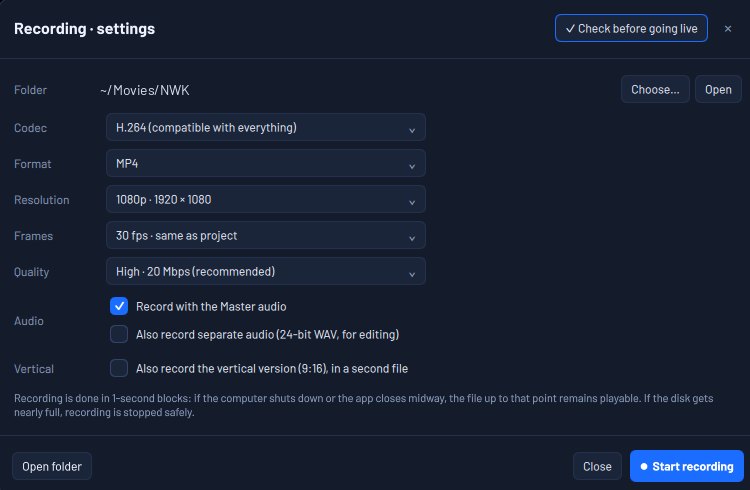
- The files use the same format (MP4 or MOV) and the same quality chosen in the recording settings.
- The files go in the recording folder, inside a session folder named with the date and time.
- MultiCorder has its own button: it works together with the Program recording or on its own.
- During the free trial, the cameras recorded separately come out clean, without the mark that the Program carries above 720p.
To keep the sound of each channel as well, NWK has multitrack recording, with one WAV file per mixer channel. See recording each channel to a separate file. NWK is sold as a subscription, with a 7-day free trial; the amounts are on the pricing page.
How to test before deciding
- Record with your own cameras, at the resolution of the event, for the full length of the event.
- Record the program and stream at the same time, as on the day.
- Watch the dropped-frame counter and the free disk space during the test.
- Open the files in the video editor you use and line them up.
The plan for the whole recording is in recording the event to edit later, and the editing is in editing ISO recordings.
Trademarks and sources
Wirecast is a product of Telestream. Ecamm Live is a product of Ecamm Network, LLC. vMix and OBS Studio are trademarks of their respective owners. NWK has no connection with these companies or projects. The information about Wirecast and Ecamm Live comes from the public pages listed in the sources, checked on November 10, 2026, and may have changed. The names are used only to identify the products.
Related questions
Is ISO recording included in every live production program?
No. It depends on the program and on the plan. Among the programs on this page, NWK includes it in every plan, Wirecast states that it is exclusive to the Pro edition and Ecamm Live states that it is exclusive to the Pro plan. Check the official page of the program before buying.
Do ISO files include titles and overlays?
It depends on the program. In NWK each camera file has the clean picture, without overlays. Wirecast describes its ISO files as clean files of the individual sources. A clean file is what lets the editor redo the graphics.
Does ISO recording need a more powerful computer?
It needs more disk, and more from the computer. Each camera is one more file being recorded at the same time. Use a fast disk, preferably an SSD, check the free space and test for the full length of the event.
In the NWK help center
- Record each camera to a separate file
- Record each channel to a separate file (multitrack)
- Recording settings
- Record the Program
Sources and references
- Wirecast: ISO Recording feature page (checked Nov 10, 2026)
- Wirecast: system requirements and supported hardware (checked Nov 10, 2026)
- Ecamm Help Center: Recording Isolated Audio and Video (checked Nov 10, 2026)
- Ecamm Network: Ecamm Live product page (checked Nov 10, 2026)
Written and reviewed by the NWK Live Production team (Setor 360 Tecnologia e Eventos Ltda). Published .
NWK records the program, each camera to its own file and each audio channel to its own WAV.
Try NWK free for 7 days
