
Short answer
Live production programs use the word multitrack for three separate things: receiving every channel of an audio interface, recording each source to its own file, and sending or recording more than one audio track in the output. The facts that differ most between programs are what gets its own file (a mixer channel, a source or a mix), the file format, the track limit, and which plan or edition includes the feature. The table below shows what the official documentation of each program states.
On this page
Three meanings of multitrack
| Meaning | What it is for |
|---|---|
| Multichannel input | Each microphone of a console or interface arrives as its own channel, so the stream is mixed inside the program instead of receiving a finished stereo pair. |
| Separate recording | Each channel or source is written to its own file during the event, to be remixed afterwards. |
| Several tracks in the output | The recorded video file or the stream carries more than one audio track, for example a second language or a track without music. |
A program can do one of the three and not the others. The third one also depends on the platform: see simultaneous interpretation and audio in more than one language.
What to ask of any program
- What gets its own file? A mixer channel, an input source or a whole mix. With sources, two microphones on one interface may share a file.
- Raw or processed? Raw sound lets you redo everything later. Processed sound keeps the equalizer and the compressor you set during the event.
- Which format? Uncompressed WAV or PCM is the usual choice for mixing later. A compressed format saves disk space.
- Are the files aligned? Files with the same length and start time open in sync in an audio editor.
- Is there a track limit, and which plan has the feature? In several programs separate recording belongs to the higher plan.
- Which system does it run on?
What to do with the files afterwards is in mixing a multitrack recording. Separate video files are a different subject, covered in ISO recording compared.
What each program documents
| Criterion | NWK Live Production | Wirecast | mimoLive | Ecamm Live |
|---|---|---|---|---|
| What gets its own track or file | Each mixer channel; the Master is optional | Multi-Track Audio Recording, up to 8 separate tracks | Each File Recording output takes the program mix, a custom audio mix or one audio source; several outputs can run | Each audio track: every microphone, movie playback, sound effects, app audio, widgets and interview guests |
| File format | WAV, 48 kHz, 24-bit or 32-bit float | Not found in the documentation we checked | Linear PCM or AAC audio; QuickTime .mov by default | One m4a file per track |
| Raw or processed | Choice between raw input and processed, pre-fader | Not found in the documentation we checked | Not found in the documentation we checked | Not found in the documentation we checked |
| Plan or edition | One subscription; see pricing | Pro plan; not listed in Studio | Not found in the documentation we checked | Pro plan only |
| System | Mac with Apple Silicon only; Windows version in development, not available | Mac and Windows | The manual page we checked mentions macOS | The feature requires a Mac with Apple Silicon |
“Not found” means the item was not on the pages listed in the sources, not that the feature does not exist. The Wirecast page also lists ASIO and WASAPI multi-channel capture device mapping as Windows only. Running on Windows is an advantage of Wirecast over NWK today.
vMix and OBS Studio have their own comparisons on this site, each with a page on audio and multitrack: NWK vs vMix and NWK vs OBS Studio.
Multitrack in NWK Live Production
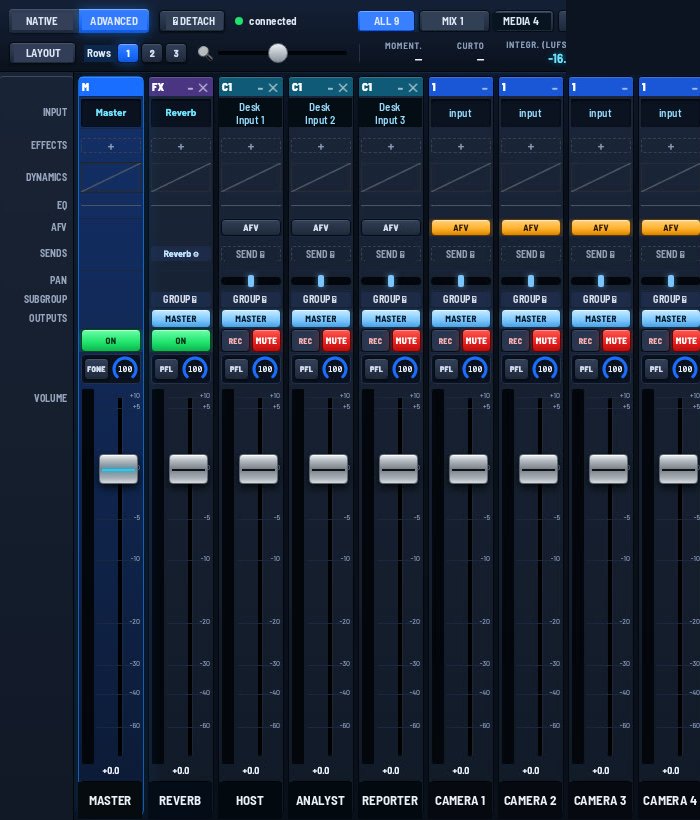
With a multichannel audio interface connected, Build the mixer creates one mixer channel for each input of the interface. See build the mixer from the audio interface.
The Multitrack button records each mixer channel you tick to its own WAV file, at 48 kHz, in 24-bit or 32-bit float. You choose between Input (raw sound, no effects) and Processed (with EQ and effects, pre-fader). All files have the same length and carry the start time, so they open aligned in an audio editor. The Master, if ticked, is file 00, in stereo. Each recording creates a folder with the date and time, and the window shows how many MB per minute the ticked tracks use. See record each channel to a separate file.
The stream and the Program recording always receive the Master. Outputs A to E are separate mixes that go to audio devices, such as a stage return or a call. NWK is sold by subscription, with a 7-day free trial.
Trademarks
Wirecast is a trademark of Telestream. mimoLive is a trademark of Boinx Software. Ecamm Live is a trademark of Ecamm. vMix, OBS and OBS Studio are trademarks of their respective owners. NWK is not affiliated with any of these companies. The information about their products comes from the public documentation listed in the sources, checked on November 10, 2026, and may have changed.
Related questions
Is multitrack recording the same as ISO recording?
No. ISO recording usually means one video file per camera. Multitrack audio recording means one audio file per channel or source. Some programs offer both, and in some each one belongs to a different plan.
Should I record the raw sound or the processed sound?
Record the raw sound when someone will mix the event again from zero. Record the processed sound when the equalizer and the compressor used during the event are part of the result you want to keep.
Why record in 32-bit float?
A 32-bit float file keeps the sound that went above 0 dB, so a channel that was too loud can be turned down afterwards without distortion. The files are larger than 24-bit files.
In the NWK help center
- Record each channel to a separate file (multitrack)
- Build the mixer from the audio interface
- Use outputs A–E and echo-free return
Sources and references
- Telestream: Wirecast pricing and plan comparison (checked Nov 10, 2026)
- Boinx Software: mimoLive manual, File Recording to Disk (checked Nov 10, 2026)
- Ecamm: Recording Isolated Audio and Video (checked Nov 10, 2026)
Written and reviewed by the NWK Live Production team (Setor 360 Tecnologia e Eventos Ltda). Published .
NWK records each mixer channel to its own aligned WAV file, raw or processed.
Try NWK free for 7 days
