Short answer
To stream an event with simultaneous interpretation, give the interpreter a clean feed of the floor sound in headphones, take the interpreter's microphone as a separate channel and build one audio mix per language. The way that works on any public platform is one stream per language: the same picture, with a different audio mix in each stream. A stream normally carries one audio mix, so each extra language needs its own encoder fed with its own mix.
On this page
How simultaneous interpretation works
The interpreter listens to the speaker in headphones and speaks the translation at the same time, a few seconds behind. The sound of the stage is called the floor. The interpreter's voice is the language channel.
- The interpreter works isolated from the room sound. A booth, or a separate quiet room. If the loudspeakers of the room reach the interpreter's microphone, the floor leaks into the language channel.
- The interpreter needs to see the speaker. Directly or on a monitor with the Program picture.
- Interpreters usually work in pairs and take turns. Plan two microphones and two headphones per language.
- The microphone needs a mute the interpreter controls. A cough or a word to the colleague must not go on air.
The two mixes around the interpreter
| Mix | What goes in | What stays out |
|---|---|---|
| To the interpreter's headphones | Every microphone of the stage, the sound of the videos, remote speakers | The interpreter's own microphone, and the room ambience |
| Language mix, to the audience | The interpreter's microphone, music and videos without speech | The floor, or the floor kept very low under the interpreter |
The feed to the interpreter is a mix-minus: everything, minus the interpreter. The page on mix-minus explains the idea.
Decide before the event what the language mix does when the speaker talks in the language of that mix. The usual answer is that the interpreter closes the microphone and the operator raises the floor in that mix, or the interpreter keeps a switch for it. Rehearse that moment, because it is where a language channel goes silent on air.
Three ways to deliver the languages
| Way | How the audience chooses | What it requires |
|---|---|---|
| One stream per language | Opens the link of the language | One encoder per language, each receiving the same picture and its own mix. The upload adds up |
| A meeting tool with language channels | Picks the language inside the meeting | A tool and a plan that offer interpretation channels, and the interpreters connected to it |
| Receivers in the room | Takes a receiver or uses a phone app, with headphones | An interpretation system fed with the language mix. It serves the people in the room, not the stream |
Some platforms and players accept more than one audio track in a single stream. That depends on the platform, the protocol and the player. Confirm it in the documentation of the platform before promising it to a client; when in doubt, use one stream per language.
One stream per language in practice
- Each language needs its own encoder. A second computer or a hardware encoder receives the Program picture and the language mix, and sends its own stream.
- Add up the upload. Two languages at the same quality use twice the upload. See streaming to several destinations.
- Name the streams by language. Put the language in the title and in the thumbnail, and give the client one link per language.
- The translation is always behind the speech. That delay is part of interpretation. Do not try to correct it with an audio delay.
- Match the loudness of the languages. A viewer who changes link should not need to touch the volume.
A remote interpreter must receive the floor through a call with low delay. The public stream arrives many seconds late and cannot be used as the interpreter's feed. The page on audio between the room and a call covers that routing.
In NWK Live Production
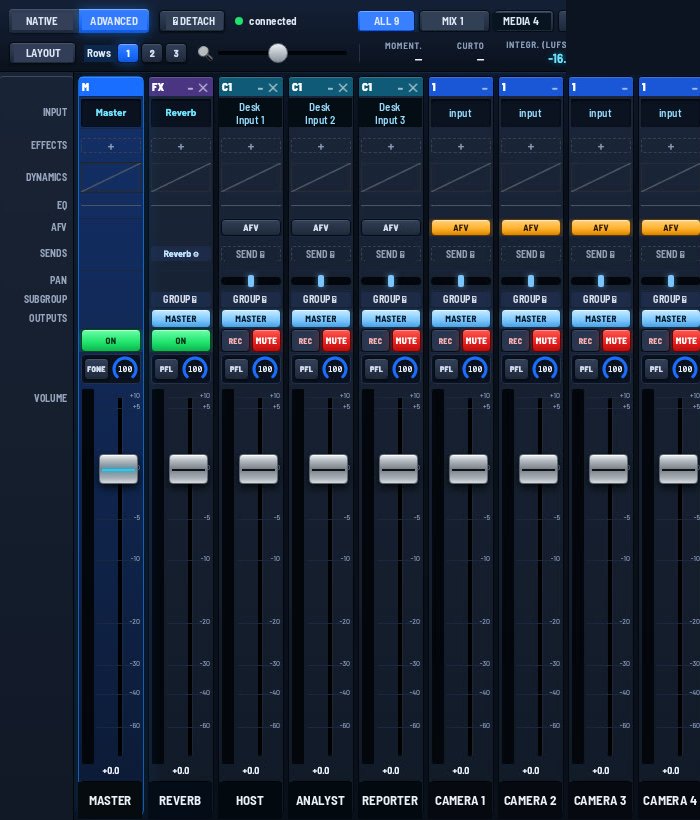
NWK has outputs A to E, and each output is a mix of its own. You choose, channel by channel, what goes to each one, and you choose the device and the channels of the audio interface where each output plays.
- The interpreter's headphones: an output with the stage channels and without the interpreter's microphone. With “Master minus…” turned on, the output carries everything that goes on air minus the inputs you check.
- The language mix: another output with the interpreter's microphone, delivered on a pair of channels of the audio interface. From there a cable takes the language mix to a second encoder or to the interpretation system of the room.
The stream and the recording of NWK always get the Master. NWK sends up to 8 streams at the same time, each with its own key and quality, and all of them carry the Master audio. The language you put on the Master is the language of the streams sent by that computer.
Multitrack recording saves each mixer channel to its own WAV file, all aligned. With the interpreter's channel recorded separately, a version of the video in the second language can be mixed after the event.
NWK is sold by subscription, with a 7-day free trial. See the pricing page.
Related questions
Can one live stream carry two languages?
It depends on the platform and on the player. Many public platforms play a single audio mix per live stream, and the viewer cannot choose a language inside it. Read the documentation of the platform before the event. The way that works everywhere is one stream per language, each with its own link.
Should the audience hear the original voice under the interpreter?
It is a choice. The floor kept very low under the interpreter shows that someone is speaking and makes pauses sound natural, but it tires the listener in a long event. Without the floor the language channel is cleaner and goes fully silent when the interpreter stops. Choose one and keep it for the whole event.
Can the interpreter work from another city?
Yes, if the interpreter receives the floor sound and the picture with low delay, through a call or a contribution link, and sends the voice back the same way. The public stream cannot be the interpreter's feed, because it arrives many seconds late. Test the full path with the interpreter before the day of the event.
In the NWK help center
- Use outputs A–E and echo-free return (Master minus…)
- Choose the audio interfaces and outputs
- Stream to several destinations
- Record each channel to a separate file (multitrack)
Written and reviewed by the NWK Live Production team (Setor 360 Tecnologia e Eventos Ltda). Published .
NWK has five audio outputs, A to E, each with its own mix, and an echo-free return with “Master minus…”, on Mac.
Try NWK free for 7 days