
Short answer
A ground loop is a hum caused by two pieces of equipment that are connected to each other by a cable and grounded at two different points. A small current flows through the shield of the cable and enters the audio as a steady low tone at the frequency of the mains, 50 or 60 Hz depending on the country. Find the loop by disconnecting one cable at a time, then break it with balanced connections, a single power point or an isolating transformer. Never remove the ground pin of a power plug.
On this page
What a ground loop is
Each piece of equipment with a grounded plug is tied to the building's ground. When a mixer on one outlet is connected to a computer on another, the two are joined twice: through the building's wiring and through the shield of the audio cable. The two ground points are never at exactly the same voltage, so a current runs around that loop. In an unbalanced connection the shield is part of the signal path, and the current is heard as hum.
The loop does not need an audio cable. The shield of an HDMI or USB cable closes a loop just as well, which is why a hum often appears at the moment a camera, a projector or a laptop charger is connected.
Hum, buzz and hiss are different noises
| What you hear | Likely cause |
|---|---|
| A steady low tone that is there even when nobody is speaking or playing | Ground loop |
| A harsher buzz that changes when lights are dimmed or a cable is moved | Interference picked up by an unbalanced or poorly shielded cable |
| Hum that stops when the laptop runs on battery | Loop through the laptop's power supply |
| Hum that changes when the guitarist turns or touches the strings | The instrument's pickups, not the installation |
| A steady "shhh" across all frequencies | Hiss: too much gain on a weak signal, not a ground problem |
Find the cable that closes the loop
- Listen to the main mix on headphones and mute the channels one at a time. The channel that carries the hum points to the equipment.
- Leave that channel open and disconnect, one at a time, every cable that reaches that equipment and the computer: audio, HDMI, USB, network, power supply. Reconnect each one before trying the next.
- If the computer is a laptop, unplug its charger for a moment. Hum that stops on battery means the loop passes through the charger.
- The cable whose removal stops the hum is the one that closes the loop. The fix goes on that connection.
Break the loop safely
- One power point. Feed the audio equipment, the computer and the cameras from the same outlet or the same power strip, within its rated load. With one ground point there is less voltage difference to drive the loop.
- Balanced connections. Use balanced outputs and inputs with XLR or TRS cables between the sound desk and the interface. A balanced input rejects noise that arrives equally on both conductors.
- DI box with ground lift. For instruments and unbalanced sources, a DI box turns the signal into a balanced one, and its ground-lift switch opens the shield connection.
- Isolating transformer. An audio isolator in line with the hum-carrying cable passes the sound and blocks the loop current. There are isolators for USB and for video connections as well.
Do not cut or bypass the ground pin of a power plug. The safety ground protects people from electric shock when equipment fails. Breaking the loop is done on the signal cable, never on the power ground.
When it is not a ground loop
- Audio cables that run alongside power cables or lighting dimmers pick up buzz. Separate them and cross them at a right angle.
- Long unbalanced cables act as antennas. Keep unbalanced runs short.
- A damaged shield or a loose connector hums when touched. Replace the cable.
- If the noise crackles or distorts instead of humming, see crackling and distorted audio.
What NWK Live Production can and cannot do
No program removes a ground loop. The tools below reduce what remains while the cabling is not fixed.
- Find the channel. PFL plays one channel in the headphones without changing what goes on air. See PFL.
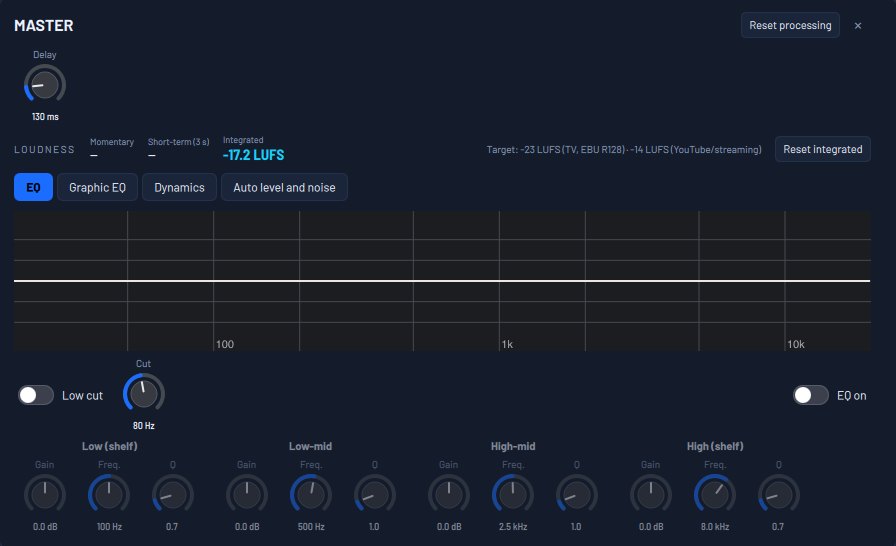
- Low cut. The EQ of each channel has a low cut with a cutoff between 20 and 400 Hz; the default is 80 Hz. It takes out the lowest part of a hum on a voice channel and leaves the higher part. See equalize a channel.
- Graphic EQ. The 31-band graphic EQ lowers individual bands by up to 12 dB.
- Gate. The gate cuts what stays below the threshold, so the noise is not heard between sentences. It comes back while the person speaks.
- Noise reduction. It is made for hiss, fans and air conditioning on a voice. See noise reduction.
Related questions
Why does the hum start when I connect the HDMI or USB cable?
The shield of that cable joins the grounds of two pieces of equipment that are already grounded through their power plugs. That second connection closes a loop. Feed both from the same power point or put an isolator on the connection that closes the loop.
Is it safe to remove the ground pin to stop the hum?
No. The ground pin protects against electric shock when equipment fails. Break the loop on the signal side, with a balanced connection, a DI box with ground lift or an isolating transformer.
Can an equalizer remove a ground loop hum?
Only in part. A low cut or a narrow cut reduces the lowest tone of the hum, but the hum also has higher components that sit in the same range as the voice. The complete fix is in the cabling.
In the NWK help center
- Low cut, 4-band EQ and graphic EQ
- Automatic level and noise reduction
- Gate, compressor and limiter
- Listen to one channel with PFL
Written and reviewed by the NWK Live Production team (Setor 360 Tecnologia e Eventos Ltda). Published .
NWK has low cut, graphic EQ, gate and noise reduction on each channel.
Try NWK free for 7 days
