
Short answer
Producing in 4K means that the program mixes the picture at 3840 × 2160, four times the pixels of 1080p, and that cameras, capture devices, computer and disk all work at that size. It pays off when the recording will be edited, reframed or shown on a large screen. In NWK Live Production the project is Full HD or 4K, and the recording and each streaming destination have their own resolution, so a 4K project can be recorded in 4K and streamed in 1080p.
On this page
What changes when the project is 4K
The resolution of the project is the size of the picture the program builds: every camera, video, title and overlay is composed at that size, and the outputs are made from that picture. A 4K frame has four times the pixels of a 1080p frame, and that multiplication reaches every stage that touches the picture.
A 1080p camera inside a 4K project is enlarged to fill the frame. The camera does not gain detail from the enlargement. 4K production starts at the sources.
When 4K pays off
| Situation | 4K project? |
|---|---|
| The recording goes to editing and the editor wants to reframe or crop | Yes, when the cameras are 4K |
| The Program feeds a large screen seen from close up | Yes, when the screen is 4K |
| The recording is an archive meant to last for years | Worth considering |
| The event is only streamed and most viewers watch on a phone | No. Put the effort into bitrate and audio |
| Cameras or capture devices deliver 1080p | No |
| The computer is already near its limit in 1080p | No |
Which resolution to send to the platform is a separate decision, explained in 720p, 1080p or 4K: which resolution to stream.
What every stage has to deliver
- Cameras: a 4K output, at the frame rate of the project. Many cameras record 4K internally and send 1080p through the video output; check the output setting.
- Capture devices and cables: each one has to accept 4K at the frame rate you use. Check the specification of the model, not the name on the box.
- Computer: more work to compose and to encode every frame. Heat and processor use rise with the resolution; see processor at its limit and a hot Mac.
- Disk: 4K recordings ask for a higher bitrate to keep the same quality, and the files grow with the bitrate.
- Internet: only when a destination is also 4K. The upload has to carry the bitrate the platform publishes for 4K, with headroom.
A 4K project in NWK
In NWK Live Production, click ⚙ Settings and open the Project tab. The Resolution options are Full HD · 1920 × 1080 and 4K · 3840 × 2160. Recording, streaming and NDI® follow the project. The change takes effect with Apply now, only while the stream and the recording are stopped; the image stops for about 3 seconds, and the inputs and the session stay the same. See resolution and frame rate.
Each output then has its own choice:
- Each streaming destination has its own resolution: 4K · 2160p, 1440p, 1080p or 720p, plus the frames and the bitrate. See quality per destination.
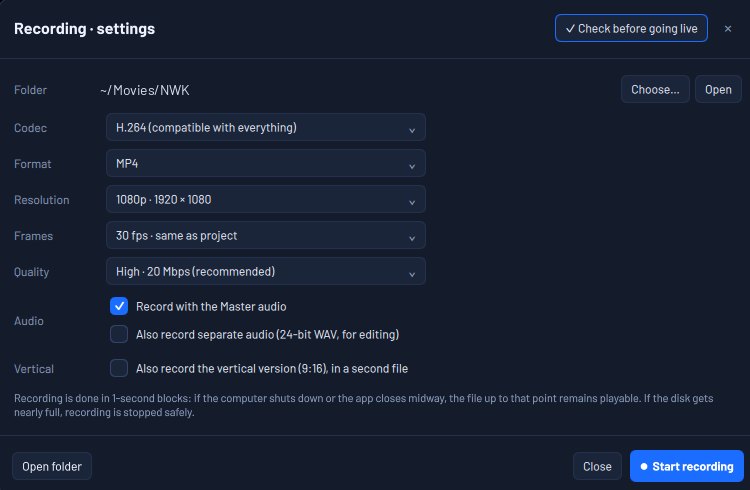
- The recording has its own resolution, 4K · 3840 × 2160, 1440p, 1080p or 720p, the codec H.264 or HEVC / H.265, and the quality Good · 12 Mbps, High · 20 Mbps or Maximum · 40 Mbps. See recording settings.
A common arrangement is a 4K project recorded in 4K and streamed in 1080p; recording in higher quality than the stream covers that case.
Recording size
The size of the file follows the bitrate, not the resolution. At 20 Mbps one hour of video takes about 9 GB; at 40 Mbps, about 18 GB. HEVC keeps the quality in smaller files, as long as your video editor opens HEVC. Before the event, multiply by the length of the event and leave free space on the disk.
Test before you commit
NWK runs on a Mac with Apple Silicon (M1 or newer) and macOS 14 or later. Whether a given setup holds a 4K project depends on the number of inputs, the frame rate, the outputs that are on and the machine, so the answer comes from a rehearsal.
Set the project to 4K, connect everything the event will use, stream to a private destination, record, and watch the footer of the main screen for the full length of the event: the FPS going out, the Lost frames, and the CPU and memory use. If the Lost count goes up, the computer is overloaded. Going back to Full HD takes one click in the Project tab, while off air.
Related questions
Can I produce in 4K and stream in 1080p?
Yes, when the program lets each output have its own resolution. In NWK Live Production the project can be 4K while each streaming destination is set to 4K, 1440p, 1080p or 720p, and the recording has its own resolution setting.
Is it worth setting a 4K project with 1080p cameras?
No. The program enlarges each 1080p camera to fill the 4K frame, and the enlargement adds work for the computer without adding detail. Keep the project in Full HD until the cameras and the capture devices deliver 4K.
How much disk space does a 4K recording take?
It depends on the bitrate of the recording, not on the resolution. At 20 Mbps one hour takes about 9 GB, and at 40 Mbps about 18 GB. In NWK Live Production the quality options of the recording are Good · 12 Mbps, High · 20 Mbps and Maximum · 40 Mbps.
In the NWK help center
Written and reviewed by the NWK Live Production team (Setor 360 Tecnologia e Eventos Ltda). Published .
In NWK the project is Full HD or 4K, and the recording and each streaming destination have their own resolution.
Try NWK free for 7 days
