
Short answer
A wireless microphone drops out for four main reasons: the signal reaches the receiver weak, because of distance or because something is in the way; another transmission occupies the same frequency; two transmitters of the same system are on the same frequency; or the batteries are running out. Place the receiver in sight of the transmitter and close to the stage, choose the frequencies at the venue with everything turned on, start with fresh batteries and keep a wired microphone ready.
On this page
How a wireless system works
A wireless system has a transmitter, which is the handheld microphone itself or a bodypack connected to a lavalier or a headset, and a receiver, which delivers the sound by cable to the mixing console or to the audio interface. From the receiver onward, the wireless microphone is a channel like any other.
Systems differ in the band they use. Some work in UHF. Others work in the 2.4 GHz band, the same one used by Wi-Fi and Bluetooth. The frequencies each country allows for wireless microphones are different and change over time. Before buying or traveling with a system, check with the telecommunications regulator of the country what can be used.
What the failure tells you
| What happens | Probable cause | What to do |
|---|---|---|
| Dropouts when the person walks away or turns their back | Weak signal: distance, or the body between transmitter and receiver | Bring the receiver closer and raise it above the heads |
| Fine in rehearsal, fails when the audience arrives | Bodies in the path and, in the 2.4 GHz band, many phones and access points | Receiver high and close to the stage; choose the frequency again with the room full |
| Noise, or another voice, with the transmitter off | Another transmission on the same frequency | Change the frequency |
| Fails when a second microphone is turned on | Two transmitters on the same frequency, or frequencies that interfere with each other | One frequency per transmitter, chosen from the plan of the manufacturer |
| Sound gets worse and then stops | Batteries | Change the batteries before the event |
| Crackle when the person moves | Cable or connector of the lavalier or headset | Replace the cable; see crackling or distorted audio |
Where to place the receiver
- In sight. The antennas of the receiver must see the transmitter. Walls, metal structures and people weaken the signal.
- High. Above the heads of the audience, not on the floor and not inside a closed metal rack.
- Close to the stage. A long audio cable from the receiver to the console is safer than a long distance by radio.
- Away from sources of interference. Keep the receiver away from Wi-Fi routers, LED screens, computers and power supplies.
- Bodypack. Keep the antenna of the bodypack free. It should not be folded or pressed against the skin.
Frequencies
- Choose the frequencies at the venue, on the day, with everything turned on: screens, lighting, other wireless systems. If the receiver has a scan function, use it.
- Give each transmitter its own frequency. Two transmitters on the same frequency interfere with each other, and neither is received properly.
- With several microphones, use the groups or channel plans in the manual of the system. Frequencies chosen at random can interfere with each other even when they are different.
- The manual states how many systems of that model can work together. Respect that number.
- Walk through the whole area the person will use, with every transmitter on, and listen.
Batteries and backup
- Start every event with fresh or fully charged batteries. Do not finish yesterday's batteries today.
- Find the battery life in the manual and plan changes for the breaks.
- Teach the person to use the mute switch and not the power switch.
- Keep a wired microphone connected and tested on a stand. When the radio fails on air, there is no time to investigate.
What NWK Live Production does and does not do
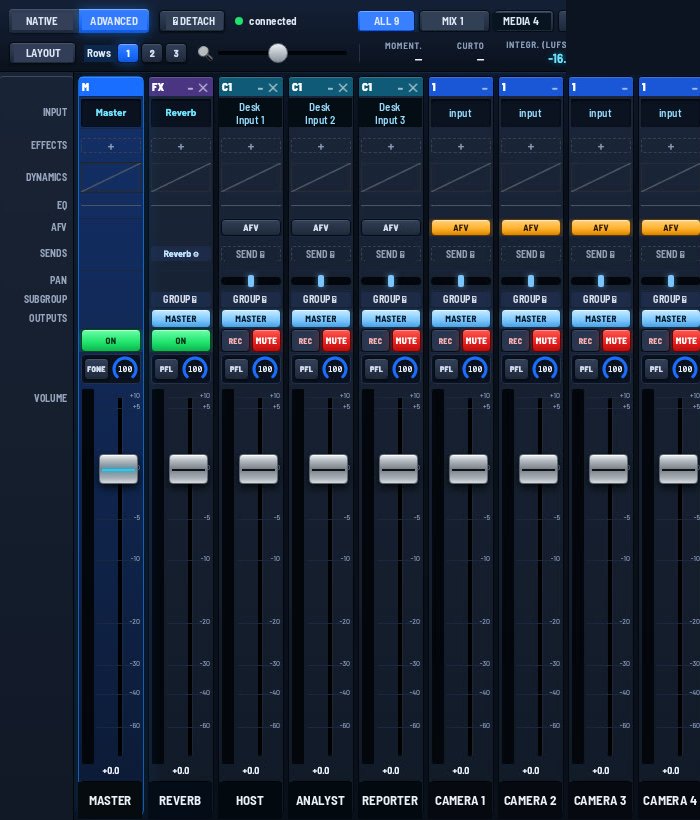
NWK receives the sound of the wireless system through the audio interface or the mixing console, as a mixer channel. No program corrects a radio dropout: the piece of sound that did not arrive does not exist. Two functions help to notice the problem before the audience does:
- PFL. PFL plays one channel in the headphones even with the fader down or the channel muted, without changing the stream. Use it to check each microphone before opening it on air. See PFL.
- Check before going live. The check listens to the microphones and interfaces for 3 seconds and warns about those that had no sound. See check before going live.
If a channel stays silent, follow No audio on the live stream.
Related questions
Why does the wireless microphone cut out when the audience arrives?
People absorb part of the radio signal, and an audience brings many phones that occupy the 2.4 GHz band. A receiver that worked in the empty room, at the back or at floor level, stops receiving enough signal. Place the receiver high and close to the stage and choose the frequency again with the room full.
Are 2.4 GHz wireless microphones good for events?
They work, but they share the band with Wi-Fi and Bluetooth. In a room full of phones and access points, range and stability drop. Keep the receiver very close to the transmitter and test with the audience present.
How many wireless microphones can I use at the same time?
It depends on the system and on how much free spectrum the venue has. The manual of each system states how many units of that model work together and which frequency groups to use. Do not go beyond that number.
In the NWK help center
- Listen to one channel with PFL
- Pre-flight check
- Add a microphone or audio interface
- No sound or the meter isn't moving
Written and reviewed by the NWK Live Production team (Setor 360 Tecnologia e Eventos Ltda). Published .
NWK has PFL on every channel and a check before going live that listens to each microphone.
Try NWK free for 7 days
