
Short answer
Many digital mixers have a USB port that works as a multichannel audio interface: one cable carries each channel of the console to the computer as a separate input. The computer sees the console as one audio device with many channels. With the channels separate, the stream gets a mix of its own, independent of the mix for the room, and each channel can be recorded to its own file. Before counting on it, check in the console manual how many channels the USB port sends and from which point of the channel.
On this page
What arrives over the USB cable
Not every USB port on a console does the same job. The manual says which of these the port does:
| Type of USB port | What the computer receives |
|---|---|
| Stereo audio interface | Two channels: the main mix or another pair you choose |
| Multichannel audio interface | Each input of the console as a separate channel, and usually some mix buses too |
The point where each channel is taken matters. On many consoles the USB sends leave right after the preamp, before the equalizer, the dynamics and the fader of the console. The computer then gets the raw sound of each microphone, and the house engineer's fader moves do not reach the stream. The preamp gain is the exception: it is shared. A gain change made for the room changes the level of that channel in the computer.
Check on the console before the event
| What to check | Where |
|---|---|
| How many channels the USB port sends and receives | The console manual |
| Which channel or bus goes to each USB send | The routing or patch page of the console |
| The sample rate of the console | The console setup. Video production normally works at 48 kHz |
| Whether the computer needs a driver | The manufacturer's page, for your version of the operating system |
On a Mac, the console appears in the Audio MIDI Setup app like any audio device. Apple describes a Format menu there, where the sample rate and the bit depth are chosen, and says they should match the settings of the device.
Why take every channel
The stream needs another balance. The mix for the room leaves out what is already loud on stage. The reasons are in why the house mix does not work for the stream.
The cost is work: someone has to mix the stream. If nobody will do that during the event, a stereo mix sent from an auxiliary of the console is the simpler setup. The analog and stereo options are compared in connect the mixing console to the computer.
The console in NWK Live Production
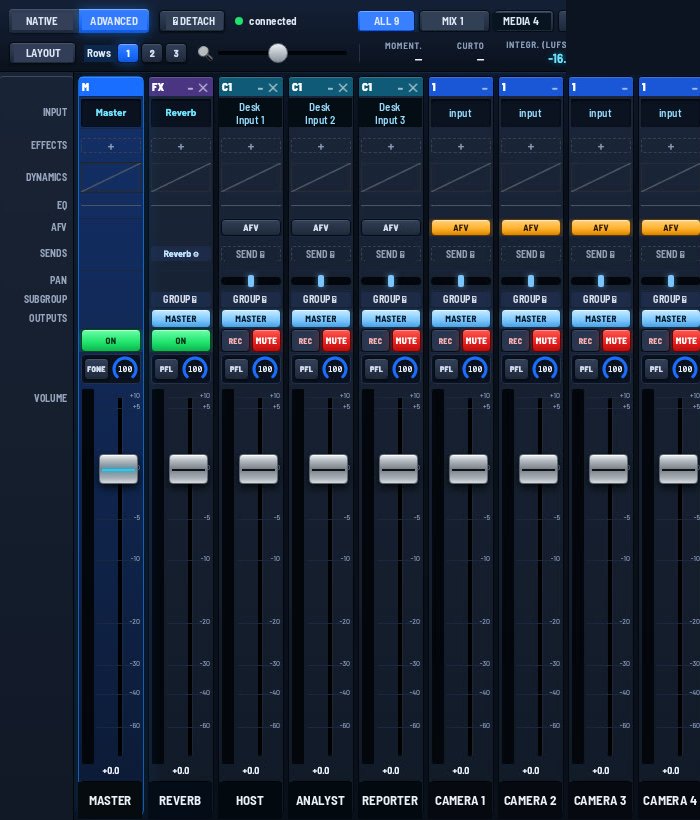
In NWK, the console connected over USB comes in as an audio device. When the device has several channels, you choose how the channels come in: all in one stereo channel, each channel separate in mono, in stereo pairs, or only one channel or one pair. On an interface with more than two channels, NWK already suggests each channel separate. See add a microphone or audio interface.
- Build the mixer. In Settings › Audio, under AUDIO INTERFACES (INPUTS), the Build the mixer button creates at once a mixer channel for each input of the interface. The Use list limits the channels in use, and only those become mixer channels. See build the mixer from the audio interface.
- Multitrack recording. Each mixer channel is recorded to its own WAV file at 48 kHz, in 24-bit or 32-bit float, all aligned. You choose between Input (raw sound, no effects) and Processed (with EQ and effects, pre-fader). See multitrack recording.
Related questions
Does every digital mixer send all channels over USB?
No. Some consoles have a USB port only for a flash drive, some send only a stereo pair, and some send every input as a separate channel. The number of channels sent and received over USB is in the specifications and in the manual of each console.
Does the USB audio from the console include the console's EQ and compression?
It depends on where the console takes the USB sends. On many consoles the sends leave after the preamp and before the processing, so the computer receives the raw sound. Some consoles let you choose the point on the routing page.
Can I record multitrack and stream from the same USB connection?
Yes, when the program receives the channels separately: the same channels feed the stream mix and are recorded one file per channel. The recording adds work for the disk, so test with the number of channels and the duration of the event.
In the NWK help center
- Build the mixer from the audio interface
- Add a microphone or audio interface
- Create a console channel
- Multitrack recording
Sources and references
Written and reviewed by the NWK Live Production team (Setor 360 Tecnologia e Eventos Ltda). Published .
NWK builds a mixer channel for each input of the interface in one click and records each channel to its own WAV file.
Try NWK free for 7 days
