
Short answer
The house mix is made to complete what the room already hears from the stage. Loud sources, such as drums and guitar amplifiers, go through the speakers very little or not at all, and quiet sources, such as vocals, go through them a lot. Sent straight to the stream, the house mix has loud, dry vocals, a weak band and no audience. The stream needs its own mix, with its own balance, room microphones and someone listening on headphones.
On this page
What the house mix is made for
In a room, the audience hears two things added together: the sound that comes straight from the stage and the sound that comes from the speakers. The house operator only puts in the speakers what is missing. A drum kit in a small hall is already loud by itself, so its faders stay low. A voice does not carry by itself, so its fader stays high.
The output of the console carries only the second half of that sum. Whoever watches online gets the speakers without the stage.
| Source | In the room | In a direct feed from the console |
|---|---|---|
| Lead vocal | Balanced with the band | Much louder than everything else |
| Drums, guitar amplifier | Loud from the stage | Weak or missing |
| Keyboard, playback tracks | Only from the speakers | Present, often too loud |
| Audience, applause, the room | All around | Absent |
What the online audience hears
- Vocals in front, band far away. The smaller the room, the bigger this difference, because more of the band is heard straight from the stage.
- A dry, empty sound. No microphone is picking up the room, so the congregation singing and the applause disappear.
- Level that moves for no visible reason. Every fader the house operator moves to fix the room changes the stream too.
- Tone made for the speakers. The equalization of the main output corrects the room and the speaker system. On earbuds that correction is an error.
Three ways to get a mix for the stream
| Way | What you get | What it requires |
|---|---|---|
| The main output of the console | The house mix, with all the problems above | One cable |
| An auxiliary send or a separate mix bus of the same console | A second balance of the same channels, with room microphones added | A free bus and someone who checks that mix on headphones |
| Each channel separately to the streaming computer | A completely independent mix, with its own equalization and dynamics | A console or interface that sends the channels to the computer, and a second person mixing |
On a bus of the console, a post-fader send follows what the house operator does, with your balance on top of it. A pre-fader send ignores the house faders, so a microphone that was lowered in the room stays open in the stream until someone closes it there. Choose knowing which of the two you have.
The page on connecting a mixing console to the computer covers the cables and outputs, and a second sound operator covers the division of work.
Room microphones and where to listen
One or two microphones pointed at the audience, mixed low, bring back the room, the singing and the applause. Send them only to the stream mix, never to the speakers.
The stream mix cannot be judged in the room, because the sound from the stage and the speakers covers what the headphones play. Use closed headphones, and when possible mix from another room. Check now and then on a phone, which is where most of the audience listens.
Keep the level of each channel healthy before balancing, and measure the final volume as described in loudness for streaming platforms.
The stream mix in NWK Live Production
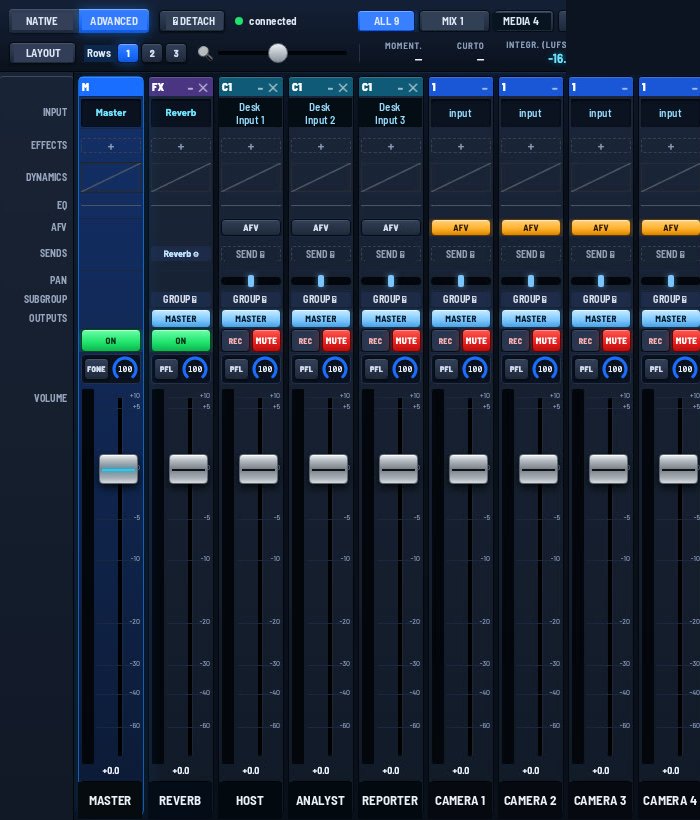
NWK has its own audio mixer. With a multichannel audio interface connected, “Build the mixer” creates one strip for each input of the interface in the Mixing tab. See build the mixer from the audio interface.
Each strip has a fader, a meter and the FX button, which opens gain, delay, EQ, dynamics, auto level and noise reduction. The stream and the recording always receive the Master, and the FX window of the Master shows the loudness in LUFS.
The mix can be run by a second person. Audio Operator opens the full mixer in a browser on another computer or tablet, protected by a PIN, and the Listen button plays the sound of NWK in that operator's headphones. See run the audio from another computer or tablet.
Related questions
Can I send the main output of the console to the stream?
You can, and it will sound the way the speakers sound without the stage: vocals loud, drums and amplifiers weak, no audience. It is acceptable only when everything the audience hears comes from the speakers, as in a lecture with one microphone.
Do I need a second sound operator for the stream?
For speech only, one person can set the stream mix before the event and leave it. For a band, the balance changes from song to song, and a second person listening on headphones makes the difference.
Why does the stream have no applause?
Because no microphone on the console is pointed at the audience. Add one or two room microphones and send them only to the stream mix.
In the NWK help center
- Build the mixer from the audio interface
- Get to know the audio mixer
- Run the audio from another computer or tablet
- Measure program loudness in LUFS
Written and reviewed by the NWK Live Production team (Setor 360 Tecnologia e Eventos Ltda). Published .
NWK has an audio mixer with EQ, dynamics and loudness in LUFS, and a second person can run it from a browser.
Try NWK free for 7 days
