
Short answer
A recording that was cut off by a crash or a power loss often does not open because the file was never closed. Many recorders write the index of an MP4 or MOV file only when the recording stops normally; without the index, a player cannot read video that is on the disk. Do not record over that disk, work on a copy of the file, and look for a second copy of the event before trying anything else.
On this page
Why a cut recording does not open
An MP4 or MOV file has two parts. One is the audio and video data. The other is an index that tells the player where each frame is, how long it lasts and how it was encoded. Many recorders write the data as the event goes on and write the index once, at the end, when you press stop.
If the computer shuts down or the program closes before that, the data is on the disk and the file has its full size, but the index was never written. The player reports a damaged or unsupported file. A file of zero bytes or a few kilobytes is a different case: the data did not reach the disk and there is nothing to read.
Some programs avoid the problem by writing the index in parts during the recording. A cut then costs only the last moments, and the file plays up to that point.
What to do first
- Stop recording to that disk. New files can be written over the space the interrupted recording occupies.
- Do not delete, rename or move the file between disks until you have a copy.
- Copy the file to another disk and work only on the copy.
- Check the size of the file. A size that matches the length of the event means the video data is probably there.
- Try to open the copy in more than one player and in your video editor. Some read an incomplete file further than others.
- Check the folder for other files from the same event before deciding the recording is lost.
Rebuilding the index of a file that has none is specialized repair work with no guaranteed result. Leave the original untouched while it is attempted.
Where another copy of the event may exist
| Place | What you get |
|---|---|
| The streaming platform | Many platforms can keep a recording of the live stream, at the quality of the stream |
| The cameras | The memory card, if the camera was recording internally |
| Per-camera (ISO) files | Each angle as a separate file, to edit the event again |
| The audio recorder or the sound console | The sound, to join to whatever picture you recover |
| A second recorder on the program output | The finished program, if one was connected |
ISO recording explains the per-camera files.
What NWK Live Production does when the recording is cut
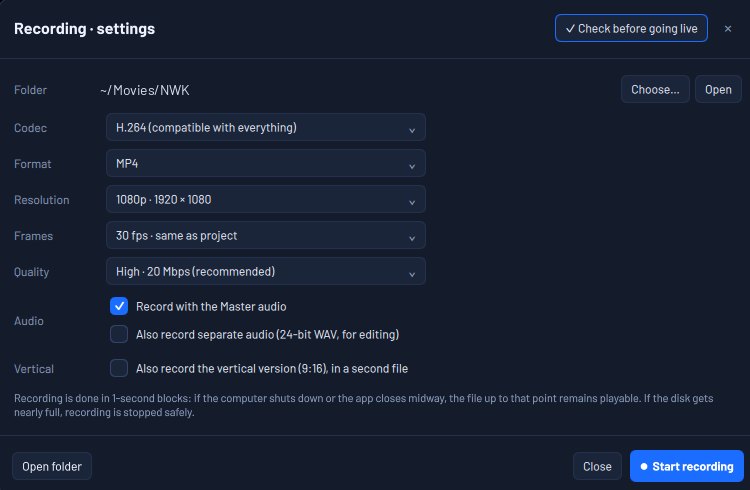
NWK records in 1-second blocks. If the computer shuts down or NWK closes midway, the file up to that point still plays. See what happens to the recording if the computer shuts down.
In Settings › General › Recovery there is an option to resume, after a crash, the stream and the recording that were active. It comes checked. The recording restarts in a new file, with the date and time in the name, and the earlier file stays playable up to the point where it stopped. After a crash, expect two or more files for the same event.
To find them, click the gear next to RECORD and click “Open” next to the folder. The folder holds the Program recordings, the vertical version and the separate WAV audio when they are on, and one folder for each MultiCorder session.
If the disk gets almost full during a recording, NWK ends the recording safely.
Before the next event
- Find out how your program writes the file. Make a short test recording, cut the power or force the program to close, and try to open the result.
- Record to a disk with free space to spare. A full disk is a common way to lose the end of a recording. External SSD for recording has the arithmetic.
- Keep the computer and the disk on a battery backup. See UPS and power at the event.
- Keep a second copy that does not depend on the computer: the card in the main camera, or a recorder on the program output.
- After the event, open the file and check the end before taking the equipment apart.
Related questions
Can a recording that was cut off by a power loss be recovered?
Often in part. If the file has a size that matches the event, the video data is on the disk and what is missing is the index. Whether it can be read again depends on the format and on how the program wrote the file. A file of zero bytes cannot be recovered.
Why does the file have several gigabytes and still not open?
Because the size comes from the audio and video data, and the player needs the index to read that data. In many recorders the index is written only when the recording is stopped normally.
Does the recording stop when the stream drops?
It should not. A recording is written to the disk of the computer and does not depend on the internet. In NWK the recording continues while the stream reconnects.
In the NWK help center
- Recording if the computer shuts down
- Resume automatically after a crash
- Open the recordings folder
- Recording settings
Written and reviewed by the NWK Live Production team (Setor 360 Tecnologia e Eventos Ltda). Published .
NWK records in 1-second blocks, so the file still plays up to the point of a crash, and it can resume the recording in a new file.
Try NWK free for 7 days