
Short answer
A hardware console is the right tool when there are loudspeakers and stage monitors to feed: it has the microphone inputs, it gives performers their return without the delay of a computer, and it keeps working if the computer stops. The mixer inside the streaming program is the right tool for the stream mix: it follows the video, treats the sources that exist only in the computer and records each channel. An event with an audience in the room usually needs both, with the console sending its channels to the computer. A studio or a podcast with a few microphones can work with the in-app mixer and an audio interface alone.
On this page
What each one does, criterion by criterion
| Criterion | External console | Mixer inside the program |
|---|---|---|
| Microphone inputs | Has the preamplifiers and the connectors | Needs an audio interface, or the console itself, to bring the microphones in |
| Sound for the room and the stage | Made for this: main outputs and monitor sends | Possible through the outputs of an interface, with the delay of the path through the computer |
| Mix for the stream | A second mix on an auxiliary, if a bus is free and someone listens to it | Made for this: a separate balance, heard on headphones |
| Sound that follows the picture | By hand | The audio of a camera or a video opens when the source goes on air |
| Sources inside the computer | Need a return path from the computer to the console | Videos, remote guests and network sources are already channels |
| Hands on the controls | One physical fader per channel | Mouse, a tablet or a controller |
| If the computer stops | The room keeps its sound | The mix stops with the computer |
| Recording each channel | Depends on the console | Depends on the program; common in programs with a full mixer |
| Cost | The console, the cabling and often an interface | Included in the program; the interface is still needed |
Three common setups
| Setup | Where it fits | Its limit |
|---|---|---|
| In-app mixer only, with an audio interface | Podcast, studio, class, event with few microphones and no loudspeakers | No sound for an audience in the room |
| Console only, with a stereo pair to the computer | Events where nobody can mix the stream separately | The stream receives the mix made for the room. The reason this sounds wrong is in why the house mix does not work for the stream |
| Both: the console feeds the room and sends each channel to the computer | Church services, concerts and events with an audience and a stream | Needs a console or interface that sends the channels separately, and a second person on the stream mix |
The cables, the outputs and the levels of the second and third setups are in connect a mixing console to the computer.
Five questions that decide
- Is there an audience in the room? If loudspeakers have to play, a console or a room sound system is part of the setup.
- Do performers need to hear themselves? Stage monitors and in-ear returns need the short path of a console. Sound that goes through a computer and comes back arrives late, and singers and musicians notice it.
- How many microphones? Count the inputs. The in-app mixer can only mix what an interface or a console delivers to the computer.
- Who mixes the stream? A separate stream mix needs a person listening on closed headphones. Without that person, an auxiliary of the console that follows the main faders is the simpler path.
- What happens if the computer fails? When the room cannot go silent, the room sound must not depend on the streaming computer.
The mixer of NWK Live Production
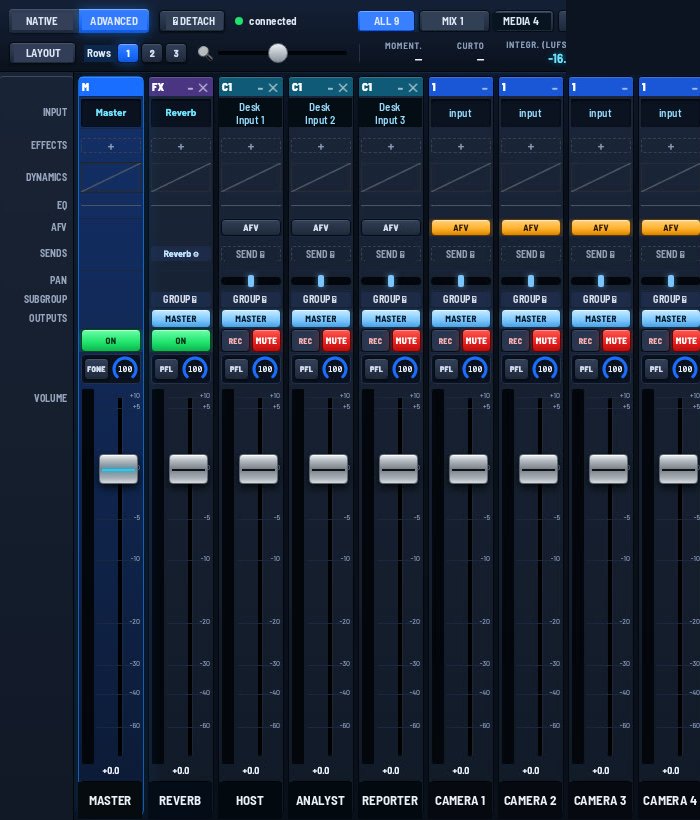
NWK Live Production has its own audio mixer, with two ways of looking at the same console: the Native mixer, simple, and the Advanced mixer, with rows as on a mixing console. See choose between the Native and the Advanced mixer.
- Channels from the interface. Build the mixer creates one channel for each input of the audio interface. See build the mixer from the audio interface.
- Processing per channel. Equalizer, gate, compressor, limiter, automatic level and noise reduction, plus Audio Unit plugins on channels and subgroups.
- AFV. With AFV on, the sound of an input follows the video.
- Other mixes. Outputs A to E are separate mixes sent to audio devices, for a stage return, a guest's headphones or a call. The stream and the recording always receive the Master. See use outputs A–E.
- A second person. The Audio Operator opens the full mixer in a browser on another computer or a tablet, protected by a PIN. See run the audio from another computer or tablet.
What this mixer solves in a stream is described in the audio mixer built into the streaming program. NWK does not replace the console that feeds the loudspeakers of a large room: in that setup the console sends the channels and NWK mixes the stream.
Related questions
Can the mixer of the streaming program replace a mixing console?
For the stream, yes, when an audio interface brings each microphone into the computer. For the loudspeakers of a room with stage monitors, no: a console gives performers their return without the delay of a computer and keeps working if the computer stops.
Do I still need an audio interface if I use the in-app mixer?
Yes, when there is more than one microphone. The mixer of the program works with the channels that reach the computer. An interface, or a console with multichannel USB audio, is what brings each microphone in as a separate channel.
Is it better to mix the stream on the console or in the program?
It depends on who is available. An auxiliary of the console gives a second balance without a second operator. Mixing in the program gives an independent mix with its own processing, and needs a person listening to the stream on headphones.
In the NWK help center
- Choose between the Native and the Advanced mixer
- Build the mixer from the audio interface
- Use outputs A–E and echo-free return
- Run the audio from another computer or tablet
Written and reviewed by the NWK Live Production team (Setor 360 Tecnologia e Eventos Ltda). Published .
NWK has a full audio mixer, outputs A to E and an operator page that opens the mixer on a tablet.
Try NWK free for 7 days