Short answer
Use the hard cut for most changes between cameras. Use a fade (dissolve) to mark a change of place, time or mood, a wipe to pass between two different subjects or segments, and a stinger to mark a replay or a new block with the look of the show. Fade to black opens, closes or pauses the program.
On this page
What each transition tells the viewer
| Transition | What happens on screen | What the viewer understands | Typical use |
|---|---|---|---|
| Cut | One picture replaces the other instantly | Same moment, another point of view | Changes of camera during speech and action |
| Fade (dissolve) | One picture blends gradually into the other | Something changed: place, time or mood | From a talk to music, opening of a segment, slow songs |
| Wipe | The new picture pushes the old one out along a moving edge | A different subject starts | Between segments, to and from a remote location |
| Stinger | An animation covers the screen and the change happens behind it | A marked moment of the show | Replay in and out, new block, sponsor |
| Fade to black | The whole picture goes to black | The program starts, ends or pauses | Opening, closing, intermission |
Choose two or three transitions for an event and repeat them with the same meaning. A different effect at each change takes attention away from the content.
Cut: the default
The cut is instant and invisible when there is a reason for it. A cut keeps the rhythm of a conversation, a sermon, a game or a song with a strong beat. When in doubt, cut. The moments that justify a cut are in when to cut.
Fade and dissolve
In a dissolve, the two pictures are on screen together for a moment while one gives way to the other. Many switchers call this transition mix or fade. A dissolve is slower than a cut, so the viewer reads it as a passage: another place, another time, a calmer moment.
A dissolve between two cameras that show the same person in similar framing looks like a mistake, because the two faces overlap. During continuous speech, prefer the cut.
Wipe and other moving effects
In a wipe, a line or a shape crosses the screen and reveals the new picture. Slides, pushes and three-dimensional effects belong to the same family: the viewer sees the transition itself. For that reason these effects work at the borders between segments and are tiring when used between cameras of the same scene.
Stinger
A stinger is a short video, usually with the logo or the colors of the show, that plays on top of the picture. At the moment the animation covers the whole screen, the switcher changes the picture underneath. When the animation leaves, the new picture is already on air.
A stinger video normally has transparency, so the picture stays visible around the animation at the start and at the end. The classic use is the entry and exit of an instant replay, which tells the viewer that the next pictures are not live.
Transitions in NWK Live Production
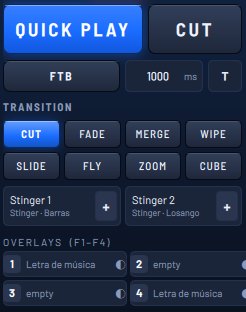
The transition panel of NWK Live Production shows Cut, Fade, Merge, Wipe, Slide, Fly, Zoom and Cube, and two stingers below them. Quick Play, or the Enter key, runs the selected transition; the Cut button always makes a hard cut. The duration is set in milliseconds, from 100 to 10000. See transition type and duration.
Each stinger takes a ready-made template or a video of yours, and you set the cut point, the moment when the video covers the screen. A video without transparency also works, but it covers the whole screen during the transition. See using a stinger.
The FTB button fades the whole Program to black, overlays included, with the same duration as the transitions, and a second click brings the picture back. The T-bar lets you run the selected transition by hand.
Related questions
What is the difference between a fade and a dissolve?
In common use, a fade goes to or comes from black, and a dissolve blends one picture into another. Many switchers use the word fade or mix for the dissolve between two sources and call the fade to black FTB.
How long should a transition last?
Between half a second and one second usually looks natural for a dissolve. Longer durations suit calmer passages. A stinger lasts as long as its video.
Does a stinger need a video with transparency?
A stinger normally uses a video with transparency, so that the picture stays visible around the animation. A video without transparency can also be used as a stinger, but it hides the whole picture while it plays.
In the NWK help center
- Choose the transition type and duration
- Use a stinger
- Fade to black (FTB)
- Run the transition by hand with the T-bar
Written and reviewed by the NWK Live Production team (Setor 360 Tecnologia e Eventos Ltda). Published .
NWK has eight transitions, two stingers, fade to black and a T-bar in the same panel.
Try NWK free for 7 days