
Short answer
List what would take the event off the air if it failed alone, and give each item a reserve. For most events the list is short: a second internet connection of another kind, a UPS for the computer and the router, a local recording that runs the whole time, a spare cable of each type, a second microphone ready, and a holding image with music. Then write down who does what in each failure and rehearse the failures before the day.
On this page
Start with the single points of failure
Follow the signal from the stage to the audience and ask at each step what happens if that item stops. An item with no alternative is a single point of failure. Three things decide which ones deserve a reserve: how likely the failure is, how long the recovery takes, and how much the reserve costs. A cable costs little and fails often. A second computer costs a lot and is rarely needed. Start with the cheap, likely failures.
What to keep in reserve
| What can fail | Reserve | Test before the day |
|---|---|---|
| Internet | A second connection of another kind, such as a phone on the mobile network | Pull the main cable during a private stream |
| Power | UPS on the computer, the router and the audio; cameras with battery and mains | Switch off the mains and time how long everything stays on |
| The stream itself | Local recording of the program, from the first to the last minute | Open the file and listen to the middle |
| A camera | A wide shot that shows everything and needs no operator; recording on the card of the camera | Cut to the wide shot and leave it for a minute |
| Cables and adapters | One spare of each type, already tested, within reach | Use the spares in the rehearsal |
| The main microphone | A second microphone on and muted, on the lectern or in the hand of an assistant | Open the second microphone and listen on the stream |
| Videos and graphics | A copy on the disk of the computer and another on a flash drive | Play each file to the end |
| The platform | A second destination, or a notice ready to be posted | Stream to both in the rehearsal |
The details of each item are in their own pages: a phone on 4G as backup internet and UPS and power at the event.
The recording is the last line
When the stream fails and does not come back, the recording is what remains of the event. A complete recording can be published an hour later, and most audiences accept that. A stream that failed with no recording is an event that was lost.
- Start the recording before the stream and stop it after.
- Record on a disk with space for twice the length of the event.
- Leave the cameras recording on their own cards when the cameras allow it. Those files do not depend on the computer.
People and decisions
Most of the time lost in a failure is spent deciding, not fixing. Decide before the event:
- Who looks at the stream as the audience sees it, on another device and another network, during the whole event.
- Who has the authority to pause the event or to continue without the stream.
- What goes on screen while a problem is being solved: a holding image with music and a short text.
- How the audience is told: a message in the chat or in the description of the stream.
- How long to try before moving to the next alternative.
Write this on one page and run each failure in the rehearsal. The routine of the rehearsal is in rehearsal and pre-show checklist.
What NWK Live Production does on its own
Part of the plan B can be in the program. NWK Live Production does the following:
- Internet. On Mac, NWK uses up to 4 networks at once: cable, Wi-Fi, cellular. Each destination goes entirely through one network. If that network drops or cannot carry the bitrate, the destination reconnects by itself through another one in 1 to 3 seconds. The networks do not add their bandwidth in one stream. See multiple internet connections.
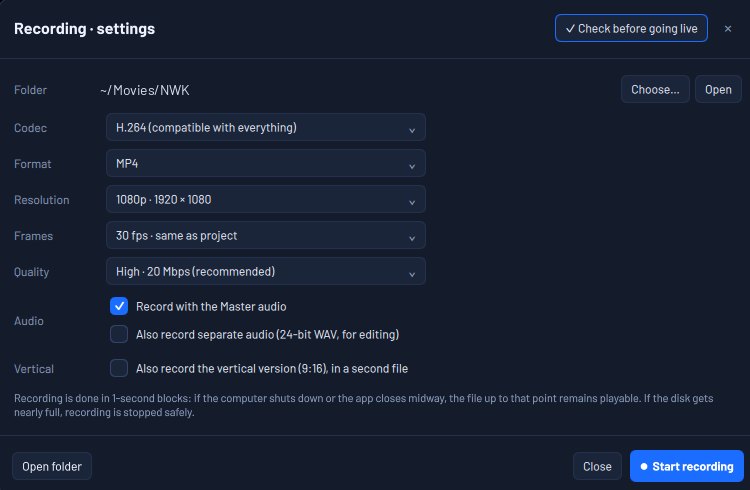
- Recording. NWK records in 1-second chunks. If the computer shuts down in the middle, the file up to that point still plays. The recording stays on the computer and continues while a destination reconnects.
- The window. If the program window closes, the stream and the recording keep going. Opening NWK again returns control without interrupting anything.
- A crash. NWK reopens the same session, with the same inputs. With the recovery option on, which is the default, the stream and the recording that were active resume by themselves, and the recording continues in a new file. See automatically resume after a crash.
- Devices. A camera, capture card or audio interface that disconnects comes back without action when the device returns.
One limit belongs in the plan: NWK confirms the license over the internet every time it opens. Open the program while there is internet and leave it open during the event. The stability page lists what NWK does to stay on air.
Related questions
Do I need a second computer as backup for a live stream?
A second computer is the most expensive reserve and the one used least. For most events, a local recording, a UPS and a program that restores the session after a crash cover the failure of the computer well enough. A second computer, with the project already open, makes sense when the stream is sold or broadcast and a few minutes off the air are not acceptable.
What do I show the audience while a problem is being fixed?
Show a holding image with the name of the event, a short text saying the stream will be back and music at a low level. Prepare this image before the event, as a source one cut away. A frozen picture or a black screen without explanation makes the audience leave.
Is a second internet connection from the same provider a backup?
A second line from the same provider usually fails together with the first one, because both share the same cable in the street and the same equipment. A reserve should come by another path: a different provider, or the mobile network. Test the reserve in the venue, at the time of the event.
In the NWK help center
- Multiple internet connections
- Automatically resume after a crash
- What happens to the recording if the computer shuts down
- The internet dropped during the stream
- The program closed during the stream
Written and reviewed by the NWK Live Production team (Setor 360 Tecnologia e Eventos Ltda). Published .
NWK switches networks, keeps the recording and restores the session on its own when something fails, on Mac.
Try NWK free for 7 days
