
Short answer
A wedding live streaming service sells three things: a stream that distant relatives can open without help, a recording the couple keeps, and an operator nobody notices during the ceremony. Agree in writing on who receives the link, where the cameras may stand, where the sound comes from and what is delivered if the venue internet fails. Record on the computer at every event, because the recording is the delivery that does not depend on the network.
On this page
What to offer
Describe each item in the proposal as something the couple can picture.
| Item | What it is | What to define with the couple |
|---|---|---|
| Live stream | The ceremony, and the reception if hired, on a platform, opened by a link | Open to anyone or only to people who receive the link; how long it stays available |
| Recording of the program | The whole stream as it went out | Format, deadline and how the file is handed over |
| Separate cameras | A clean file from each camera, for editing | Whether editing is included or the files go to the videographer |
| Vertical clips | Short upright pieces for social networks | How many and from which moments |
What to agree before the day
- Link and privacy. Most couples want only the guests to watch. Platforms offer a stream that only people with the link can open. Define who sends the link, and to whom.
- Camera positions. Churches and officiants have rules about where equipment may stand. Ask before the day, not at the door.
- Photographer and videographer. Decide who has the aisle. A fixed camera that someone stands in front of is a lost angle.
- Sound. Who runs the venue sound and which output that person can give you.
- Music. A platform can mute or block a stream that carries recorded music, and the rules change by country and by platform. Refer the couple to the copyright entity of their country.
- Failure. Write down what the couple receives if the internet fails: the recording, delivered afterwards.
Why a wedding is hard to stream, and the minimum kit
There is no second take and no rehearsal with the real content. Churches, farms and beaches often have weak internet or none by cable. The vows are spoken quietly, sometimes with no sound system at all.
- Two cameras: one fixed wide shot that always works, and one closer on the couple.
- Two sound sources: the output of the venue mixer, and your own microphone near the officiant as a backup.
- Two internet connections from different carriers, measured at the venue at the same time of day as the ceremony.
The step by step for the day is in how to live stream a wedding. The spare items are listed in plan B for a live event.
Delivery
Before leaving the venue, open the recording and listen to the vows. A problem found that night can still be solved with the separate camera files or with the videographer's audio.
Deliver what the proposal lists, by the date it states, with file names the couple understands. Say how long you keep a copy. One week before the wedding, send the relatives the link with the time and the time zone, and send it again on the day.
Where NWK Live Production fits
NWK Live Production is a live production program for Mac. These features apply to a wedding service.
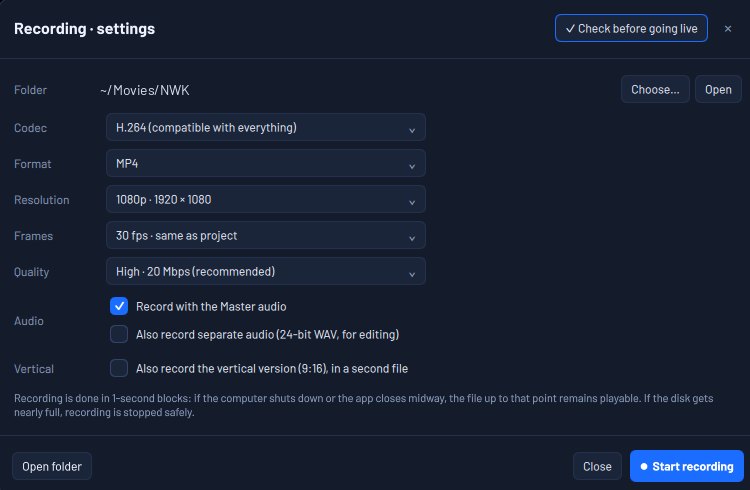
- The recording the couple keeps: the RECORD button records everything that goes out on Program, with the Master audio. Recording and streaming are separate, and ending the stream does not stop the recording.
- Files for the edit: MultiCorder records each camera to its own file, with the clean image and no overlays. All files start together.
- Vertical clips: NWK can record a second, upright file with a 9:16 crop of the Program that you position on screen.
- If power fails: the recording is written in 1-second blocks, so the file stays playable up to the point where the computer shut down.
- Venue internet: NWK can use up to 4 networks, such as cable, Wi-Fi and cellular. If one goes down, the destination reconnects over another in 1 to 3 seconds.
NWK is sold by subscription, with a 7-day free trial. See the pricing page.
Related questions
Should a wedding live stream be public or private?
Ask the couple, and write the answer in the contract. Most couples prefer a stream that only people with the link can open. Define who sends the link to the guests and whether the video stays available after the wedding, and for how long.
What happens if the venue internet fails during the ceremony?
The stream stops or reconnects, and the recording on the computer continues. For that reason the recording has to run at every wedding, and the contract has to say that the couple receives the recording afterwards if the stream fails. Bring two connections from different carriers to reduce the risk.
How many cameras does a wedding live stream need?
Two cameras cover most ceremonies: a fixed wide shot that is always usable and a closer shot of the couple. A single camera works when the budget is small, but any problem with that camera is visible to everyone. Add a third camera only if someone can operate it.
In the NWK help center
- Record the Program
- Record each camera
- Also record the vertical version (9:16)
- Use more than one internet connection
- Pre-flight check
Written and reviewed by the NWK Live Production team (Setor 360 Tecnologia e Eventos Ltda). Published .
NWK records the Program, each camera and a vertical version while it streams, on Mac.
Try NWK free for 7 days
