Short answer
To live stream high school or college sports, settle three things before buying equipment: the image consent of the athletes, who may watch the stream, and whether the school network lets the stream out. Then build a fixed position in the gym with one wide camera, a computer with a scoreboard on screen and a wired connection, and give each student one role. Add a second camera, commentary and replay as the crew gains practice.

On this page
Three decisions before the equipment
| Decision | Who answers |
|---|---|
| Image consent of the students, and of the visiting team | The school administration and the body that organizes the competition |
| Who may watch: anyone, or only people with the link | The school administration, following its own policy |
| Whether the competition allows streaming, and by whom | The school league, the conference or the federation |
| Whether the school network lets a live stream out | The technology staff of the school |
The image of minors is regulated differently in each country and, often, in each school system. This page is not legal advice: ask the administration and the organizing body, and keep the answers in writing. Streaming platforms offer visibility options that limit who finds the video; read what each option does on the official page of the platform.
The gym: light, sound and network
- Light. Gym lamps can flicker on camera and daylight from outside changes the exposure during the afternoon. Set exposure and white balance by hand and test at the time of the game.
- Sound. A gym echoes. The camera microphone records a wash of noise. Put the commentators on headset microphones, close to the mouth, and use one microphone for the crowd at a low level.
- Network. School networks often block streaming services. Ask the technology staff for a wired port that reaches the platform, and test it on a school day, when the network is in use.
- Position. A high point at the center line, away from the path of the public.
Where the other cameras go is in sports coverage: a basic camera plan.
A crew of students
Students learn quickly and leave every year. Organize the crew so that the knowledge stays in the school.
- One role per student: camera, switching, scoreboard, commentary. Rotate the roles between games, never during a game.
- A responsible adult who can stop the stream and who has the password of the channel.
- Each new student spends one game next to an experienced one before taking a role.
- Rules for commentary: names and plays, no comments about the referee or about students of the other school.
Replay with a small crew has its own page: replay in school and amateur sports.
More than the stream
The same setup serves the coaching staff and the families. A recording of each camera, without graphics, is useful for game analysis. Short clips serve the school channels, if the consent covers that use. Decide where the recordings are stored, who can access them and for how long they are kept.
What NWK has for school sports
NWK Live Production is a live production program for Mac with Apple Silicon. For a school crew, it has:
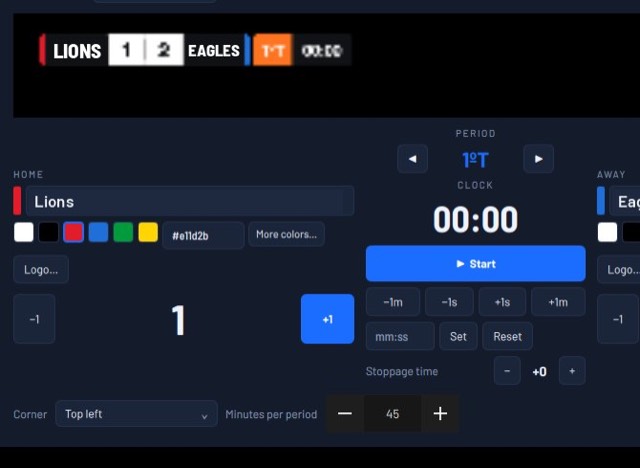
- A scoreboard for soccer, futsal, volleyball and basketball, with keys F5 to F10, so that one student keeps the score without touching the switching.
- Operators in the browser, each with a PIN: a student runs the audio, the scoreboard or the replay from a tablet or a phone, with nothing to install.
- A recording of each camera in its own file, with the clean picture.
- A check before going live that lists what needs attention in inputs, microphones, disk, internet and destinations.
NWK is sold by subscription, with a 7-day free trial; see the pricing page.
Related questions
Do we need permission to stream students playing?
Ask the school administration and the body that organizes the competition before the first stream. Rules about the image of minors change from country to country and from one school system to another, and the visiting team has its own rules. Keep the consents and the answers in writing.
Can students run the whole production?
Yes, with an adult responsible for the channel and for stopping the stream if needed. Give one role to each student, use a printed checklist and let each new student watch one game next to an experienced one.
Why does the stream fail on the school network?
School networks often filter video and streaming services. Ask the technology staff to allow the streaming platform on a wired port and test on a normal school day.
In the NWK help center
- Run a sports scoreboard
- Operators in the browser
- Record each camera to a separate file
- Check everything before going live
Written and reviewed by the NWK Live Production team (Setor 360 Tecnologia e Eventos Ltda). Published .
NWK has a scoreboard, replay and browser operators with a PIN, so each student has one role on one screen.
Try NWK free for 7 days