Short answer
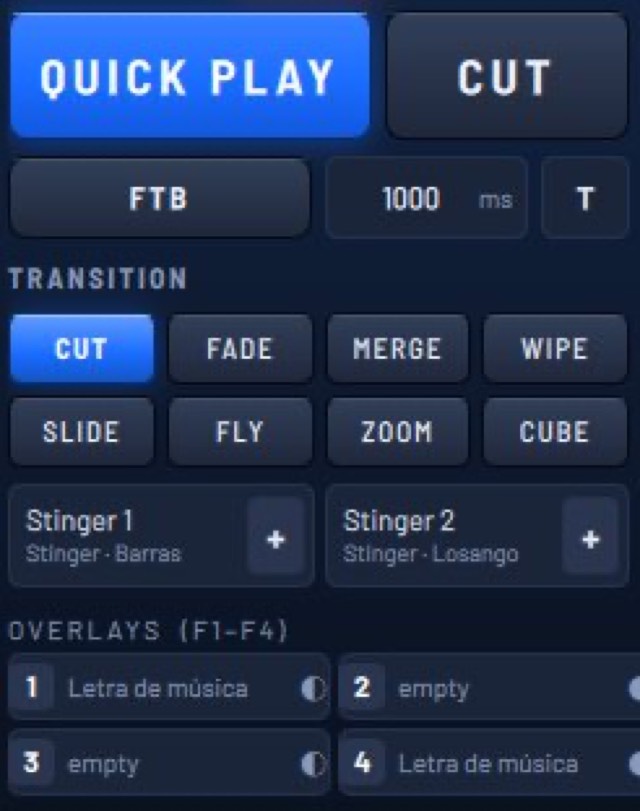
To direct the switching from another computer, the switcher has to open in the browser of a second machine, and the crew has to agree on who does what. The director, on the second machine, chooses the shots and calls what goes on air. The operator, at the production computer, looks after inputs, sound, recording and the stream. NWK Live Production has a switcher in the browser for the director, with PGM and PVW, CUT, AUTO, transitions, overlays, stingers and Fade to Black.
On this page
Step by step
- Write down what belongs to the director and what belongs to the operator of the production computer.
- Put the director's machine on the same network as the production computer, by cable when possible.
- Open the director's switcher in the browser of the second machine, with its own PIN.
- Agree on the words the two will use to talk during the event.
- Rehearse a full segment with the real cameras, overlays and stingers.
- Rehearse the handover: the operator takes the switching if the second machine fails.
Two jobs, two machines
Directing and operating are different jobs. The director watches the event and decides which shot the audience sees. The operator watches the machine and keeps every source, the sound and the stream working. On one screen the two jobs compete for the same mouse. On two machines each person sees only what that person needs.
| Task | Director, second machine | Operator, production computer |
|---|---|---|
| Choosing the next shot and taking it to air | Yes | Only if the director asks |
| Transitions, overlays, stingers and Fade to Black | Yes | No |
| Inputs: adding, reconnecting, fixing a camera with no signal | No | Yes |
| Sound, when there is no sound operator | No | Yes |
| Destinations, starting and stopping the stream and the recording | No | Yes |
What the feature is and why it exists is explained in director switching in the browser.
What the director has in NWK
In NWK Live Production the director cuts the shots and calls what goes to air from another machine, with nothing but the switcher on screen:
- Media bank with PGM and PVW.
- CUT, AUTO and the transition effects.
- Overlays, stingers and Fade to Black.
- The replay only goes on air when the director says so.
Like the other operator pages of NWK, the director's switcher opens in the browser of a computer, a tablet or a phone, with its own PIN, over the network or over the internet. Nothing is installed on the director's machine. What Preview and Program are in the program is in the help article Preview and Program.
Where the director sits
The production computer usually stays where the cables arrive. The director works better from a place with a view of the stage or the field, or in front of a monitor that shows the sources. A director who cannot see what the cameras are doing switches late.
- Give the director a table of the director's own, away from the cables and from people asking questions.
- Use a screen large enough for the director to hit the right button without looking twice.
- If the director cannot see the event directly, place a monitor with the sources in front of the director.
How the two talk
Two people working on the same program without talking produce cuts that nobody asked for. Agree on a short vocabulary and use it in the rehearsal:
- The operator announces problems and solutions: camera 3 has no signal, camera 3 is back.
- The director announces what comes next when the next item depends on the operator: video in one minute, guest coming in.
- Only the director takes things to air. The operator prepares and says that the item is ready.
When the two are not side by side, use an intercom or a simple alternative; the options are in crew communication and intercom.
The network between the two machines
The director's commands travel over the network, so the network becomes part of the switcher. Connect the director's machine by cable when the venue allows it. On Wi-Fi, test in the venue with the audience present, because a network that works in an empty room can slow down when hundreds of phones connect. Leave the director's machine on mains power, with the screen lock and the sleep timer off.
If the second machine fails
The production keeps running on the production computer, so the operator can take the switching on the program itself. Rehearse this handover once: the director says that the second machine is gone, and the operator switches until the director returns. In sports, agree on the replay as well. The replay operator prepares the play, and the play only goes on air when the director calls it; the replay side is in replay in NWK.
NWK is sold by subscription, with a free 7-day trial; see the pricing page.
Related questions
Does the director need to install the program on the second machine?
No. In NWK the director's switcher opens in the browser of a computer, a tablet or a phone, with its own PIN. The production keeps running on the production computer.
Who starts the stream when the director is on another machine?
The operator at the production computer. Keep destinations, stream and recording with the person who can see the machine, and leave the director with the shots and with what goes on air.
Can a replay go on air without the director?
In NWK the replay only goes on air when the director says so. The replay operator prepares the play while the live action continues, and the director decides if and when the play is shown.
In the NWK help center
Written and reviewed by the NWK Live Production team (Setor 360 Tecnologia e Eventos Ltda). Published .
NWK has a switcher in the browser for the director: PGM and PVW, CUT, AUTO, transitions, overlays, stingers and Fade to Black, from another machine.
Try NWK free for 7 days