Short answer
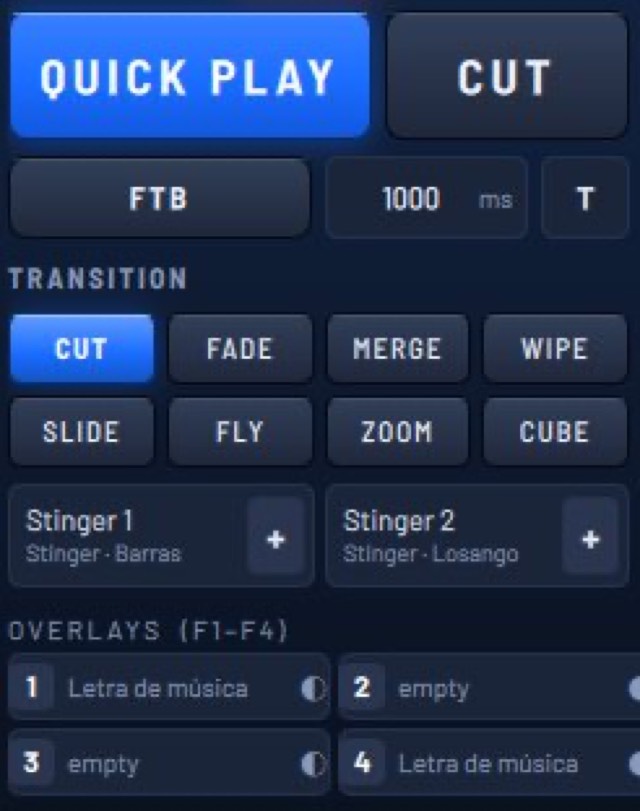
Remote switching means the director cuts the program from a machine other than the one that runs the production. The production computer keeps doing the video work, and the second machine shows only the controls of the cut. NWK Live Production has a switcher that opens in the browser, where the director cuts the shots and calls what goes on air from another machine, with PGM and PVW, CUT, AUTO, transitions, overlays, stingers and Fade to Black.
On this page
Why take the cut off the production computer
- The screen of the production computer is shared with audio, graphics, recording and streaming. The director needs to see the shots and nothing else.
- The computer usually sits where the cables arrive. The director is better placed where the event can be seen or the crew can be heard.
- Splitting the work lets one person look after the machine and another look after the story being told. The roles are described in live production crew roles.
What a director desk needs
| Control | What it is |
|---|---|
| PGM (Program) | What the audience is seeing now |
| PVW (Preview) | The shot chosen to go on air next |
| CUT | Instant change from Preview to Program |
| AUTO | The same change, made with the chosen transition |
| Overlay | A layer on top of the program, such as a lower third or a scoreboard |
| Stinger | An animated transition that covers the screen while the shot changes |
| Fade to Black | Takes the whole program to black, at the start and at the end |
When each transition fits is covered in cut, fade, wipe and stinger.
The director desk in NWK Live Production
In NWK the director works from another machine, in the browser, with nothing but the cut on screen:
- A media bank with PGM and PVW.
- CUT, AUTO and the transition effects.
- Overlays, stingers and Fade to Black.
- The replay goes on air only when the director calls it.
What Preview and Program are in the program is explained in the help article Preview and Program.
The director and the replay
In sports, the replay operator prepares the play while the game goes on, and the director decides whether and when the play is shown. Keeping that decision on the director desk avoids a replay entering over a restart of the game. The replay side is described in instant replay in NWK.
Before relying on a remote cut
- Rehearse with the director on the second machine, with the same network that will be used at the event.
- Agree on who does what. Two people changing the same program without talking produce cuts nobody asked for.
- Keep someone at the production computer who can take over the cut if the second machine fails.
Related questions
What is the difference between CUT and AUTO?
CUT changes from Preview to Program instantly. AUTO makes the same change with the selected transition, such as a fade, over the time set for it.
Who decides when a replay goes on air?
The director. On the NWK director desk the replay goes on air only when the director calls it; the replay operator prepares the play and waits.
What is Fade to Black used for?
Fade to Black takes the whole program, with everything on top of it, to a black screen. It is used to open and close a broadcast, and in an emergency when nothing on screen should be seen.
In the NWK help center
Written and reviewed by the NWK Live Production team (Setor 360 Tecnologia e Eventos Ltda). Published .
NWK has a switcher in the browser for the director: PGM and PVW, CUT, AUTO, transitions, overlays, stingers and Fade to Black, from another machine.
Try NWK free for 7 days