
Short answer
Whether a Mac mini handles a 4K multicam production depends on the number of cameras, the frame rate, what is recorded and streamed at the same time, and the disk. No general number is valid for every setup. Plan the capture path and the disk first, then rehearse for the full length of the event while watching the frames going out, the lost frames and the processor.
On this page
Where the work comes from
A 4K frame has four times the pixels of a 1080p frame. In a 4K multicam production that multiplication reaches every stage:
- Each camera arrives as a 4K signal that the computer receives and shows.
- The program composes the 4K picture with cameras, titles and overlays.
- Each recording is one more 4K file being encoded and written at the same time.
- Each stream is one more encode.
Ports and capture on the Mac mini
The HDMI port of a Mac mini is an output for a display. Cameras come in through capture devices, or over the network.
According to the Apple technical specifications, the Mac mini has two USB-C ports with USB 3 on the front, at up to 10 Gb/s, and three Thunderbolt ports, one HDMI port and one Ethernet port on the back. The Thunderbolt version depends on the chip. Memory and storage are chosen in the configuration at purchase.
- Keep the back Thunderbolt ports for what moves the most data: 4K capture devices and the recording disk.
- Check that each capture device accepts 4K at the frame rate of the project. Many accept 4K only at lower frame rates.
- Do not put two 4K capture devices and the recording disk on the same unpowered hub.
The Mac mini as a production computer in general is covered in the Mac mini in live production.
What NWK Live Production gives you for this
NWK runs on a Mac with Apple Silicon (M1 or newer) and macOS 14 or later.
- The project is Full HD · 1920 × 1080 or 4K · 3840 × 2160, chosen in Settings › Project. Recording, streaming and NDI® follow the project. The change is applied only with streaming and recording stopped. See resolution and frame rate.
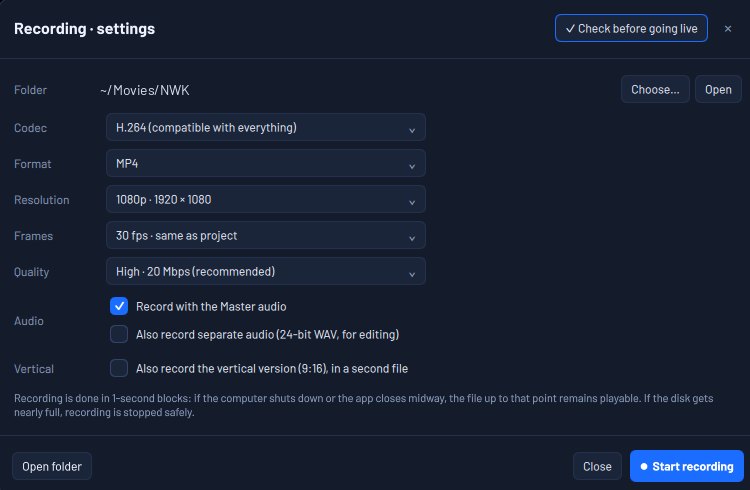
- The MultiCorder records each selected input to its own file, with the clean image, without overlays. All the files start together and carry the Master audio, in the same format and quality chosen in the recording settings. The MultiCorder has its own button and works together with the program recording or alone. See record each camera.
- The footer of the main screen shows the project resolution and rate, the FPS going out, the Lost frames and the CPU and memory use. If the Lost count goes up, the computer is overloaded.
How to test in rehearsal
- Set the project to 4K at the frame rate of the cameras.
- Connect every camera of the event, in the ports that will be used on the day.
- Start everything the event will use: the per-camera recording, the program recording and the stream to a private destination.
- Let it run for the full length of the event. Heat takes time to show.
- Watch the FPS going out, the Lost count and the CPU in the footer, and write down the values every few minutes.
- Open the recorded files at the end and check the last minutes of each one.
If the Lost count rises, reduce in this order and test again:
| Change | What it relieves |
|---|---|
| Record fewer cameras separately | Encoding and disk |
| Go from 60 to 30 frames per second | Every stage, by half |
| Stream in 1080p from the 4K project | Encoding and upload |
| Go back to a Full HD project | Every stage |
What to do when the processor stays near its limit or the computer heats up is in high CPU and overheating.
Related questions
How many 4K cameras can a Mac mini record at the same time?
It depends on the model, the frame rate, the codec, the disk and what else is running, so no single number is valid for every setup. Rehearse with the cameras of the event for its full length and watch the lost frames and the processor.
Can cameras be connected to the HDMI port of the Mac mini?
No. The HDMI port of the Mac mini is an output for a display. Cameras are connected through capture devices on the Thunderbolt or USB ports, or arrive over the network.
Is it better to record 4K multicam to the internal disk or to an external SSD?
An external SSD keeps the recordings off the system disk and is easy to hand to the editor. It needs sustained write speed for all the files at once and a port that is not shared with capture devices on an unpowered hub.
In the NWK help center
Sources and references
Written and reviewed by the NWK Live Production team (Setor 360 Tecnologia e Eventos Ltda). Published .
NWK has 4K projects, per-camera recording to separate files and a footer with FPS, Lost frames, CPU and memory.
Try NWK free for 7 days
