Short answer
There are four common ways to show the score on a live stream: the scoreboard built into the production program, a graphic that reads a spreadsheet, an overlay that comes from a web page, and a camera pointed at the physical scoreboard of the venue. The built-in scoreboard is the most direct for one operator and keeps the clock inside the program. The spreadsheet fits when another person keeps the score or the data already exists. The web page fits when a scoring service already draws the graphic. The filmed board needs no operator, and it is the hardest to read.
On this page
The four ways by criterion
| Criterion | Scoreboard in the program | Graphic fed by a spreadsheet | Web page overlay | Filmed physical board |
|---|---|---|---|---|
| Who updates the score | The operator of the program, with buttons or keys | Whoever edits the spreadsheet, from any place | Whoever runs the panel of the service that draws the page | The official scorer of the venue |
| Game clock | Runs in the program; the operator starts and stops it | Not practical: the graphic only changes at each new read | Runs in the page, when the service has a clock | The official clock of the game |
| Delay between the play and the screen | As long as the operator takes | The read interval, plus the time the spreadsheet takes to publish the change | Depends on the service and on the internet | None |
| What it needs | Only the production program | A graphic linked to data, and internet when the spreadsheet is online | A program that shows a web page as a source, and internet | One more camera with a clear view of the board |
| Look | The layout the program offers | The title you design | The layout of the page | The board as it is, with the light and the distance of the venue |
| When it fails | The score is wrong until the operator fixes it | The graphic stops at the last values that were read | The page stops updating or goes blank | The board is unreadable or out of frame |
Questions that decide
- Who will keep the score? If the person who cuts the cameras also keeps the score, the scoreboard has to be one key away, inside the program. If a second person keeps the score from the stands or from the table, a spreadsheet or a web panel lets that person work from a phone.
- Does the sport have a clock? A clock that counts every second has to run in the program or in the page. A spreadsheet read every few seconds works for score, sets and fouls, and does not work for a running clock.
- Does the data already exist? When the league or the venue already uses a scoring service, repeating the score by hand creates a second source of errors. Use the page or the data of that service.
- How is the internet at the venue? The scoreboard in the program and the filmed board work with no internet. An online spreadsheet and a web page depend on it.
- How many games in one day? In a tournament, team names and logos change every game. Prepare them in advance, in whatever way you choose.
The ways can be combined
The four ways answer different needs, and a stream often uses two. A common setup keeps the score and the clock in the scoreboard of the program, and uses titles fed by a spreadsheet for what changes more slowly: lineups, standings, results of other games. The page titles linked to a spreadsheet explains how such a table is prepared.
A camera on the physical board is also useful when it never goes on air: the operator looks at that camera to confirm the score and the clock before correcting the graphic. The routine of the person who keeps the score is in running the scoreboard during a game.
The four ways in NWK Live Production
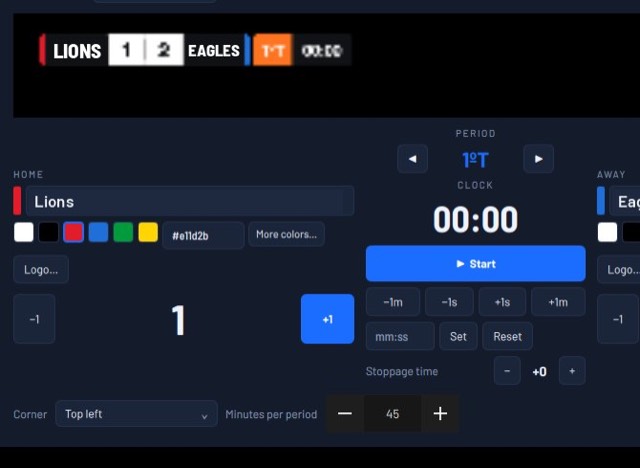
- Scoreboard in the program. NWK has a sports scoreboard for soccer, futsal, volleyball and basketball. It is added as an input, with team names, colors and logos, and goes on air as an overlay. The window has the score buttons, the period and the clock; depending on the sport, fouls, sets and possession or serve appear. The keys F5 to F10 score a point, start and stop the clock, change the period and mark fouls, Shift with F5 or F6 undoes a point, and the keys work with the window closed. See run a sports scoreboard.
- Spreadsheet. A title can read a Google Sheet or a JSON, XML or CSV address or file. You choose which column fills each field and how often the program reads again, from 2 to 600 seconds. If a read fails after a good one, the title keeps the last table. See pull live data into a title.
- Web page. The web page input turns an address into an input, in the size you choose. The page refreshes about 10 times per second and can be used on its own, as an overlay or inside a template. See add a web page.
- Filmed board. The camera pointed at the board is one more camera input.
For a sport outside those four, the options in NWK are the title with live data and the web page. NWK runs on Mac with Apple Silicon and is sold by subscription, with a 7-day free trial; see the pricing page.
Related questions
Can I run a scoreboard from Google Sheets?
Yes, for the numbers that change a few times per game: score, sets, fouls. The production program needs a graphic that reads the spreadsheet at an interval. A clock that counts every second should run in the program or in a web page, because the graphic only changes at each read.
Do I need a separate scoreboard program?
Not when the production program has a scoreboard for your sport. A separate program or a scoring service makes sense when the sport is not covered, when the league already uses that service, or when the score is kept by someone far from the production computer.
Is it enough to film the scoreboard of the gym?
It works as a minimum and needs no operator. The numbers are small on a phone screen and depend on the light and on the camera position, so a graphic is easier to read, and the filmed board remains useful as a reference for the operator.
In the NWK help center
Written and reviewed by the NWK Live Production team (Setor 360 Tecnologia e Eventos Ltda). Published .
NWK has a scoreboard for four sports, titles that read a spreadsheet and a web page input.
Try NWK free for 7 days