Short answer
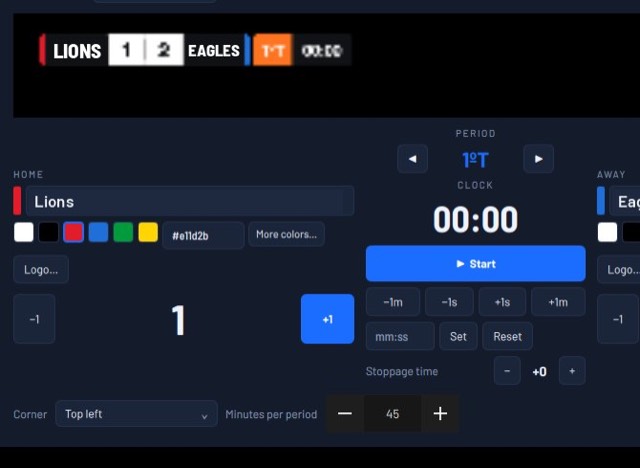
A sports stream needs a scoreboard on screen the whole time, with the teams, the score, the period and the clock, updated within a second or two of each play. The scoreboard can be built into the production program or come from a separate graphics program. NWK Live Production has a built-in scoreboard for soccer, futsal, volleyball and basketball: you add it as an input, type the teams, put it on air as an overlay and run it with buttons or with the keys F5 to F10.
On this page
What the scoreboard is for
The audience of a live game does not arrive at kickoff and stay to the end. People open the stream at any minute, on a phone, often without sound. The scoreboard is what tells them where the game stands. A stream without one makes the commentator repeat the score all the time, and still loses whoever is watching muted.
There are three common ways to show the score. Pointing a camera at the scoreboard of the venue is the cheapest and the hardest to read. A graphic prepared in an image editor looks good but cannot change during the game. A scoreboard that the operator updates live, over the picture, is the one that solves the problem.
What each sport asks of a scoreboard
| Sport | What changes in the NWK scoreboard |
|---|---|
| Soccer | Stoppage time, added and removed with − and + |
| Futsal | The clock counts down |
| Volleyball | Sets, with a button to close the set |
| Basketball | +2 and +3 buttons besides +1, and a clock that counts down |
Depending on the sport, the window also shows fouls and a possession or serve button. The window also has the minutes per period and buttons to change the period.
Setting up the scoreboard in NWK
You click Add input, open Sports scoreboard and choose the sport. The Scoreboard window opens with the HOME side and the AWAY side. On each side you type the name of the team, choose its color and load a logo, preferably a PNG with a transparent background. Then you click Put on air (Overlay 1), and the scoreboard appears over the Program.
In the settings of the window you choose the corner of the screen, top left or top right, and the minutes per period. Swap sides exchanges the teams, and New game resets everything after asking for confirmation. The steps are in run a sports scoreboard, and how overlays work is in use overlays.
Running it during the game
The person who updates the score should not have to look away from the game. NWK has keyboard shortcuts for the scoreboard, and they work with the scoreboard window closed.
| Key | What it does |
|---|---|
| F5 / F6 | Point for home / away |
| Shift + F5 / Shift + F6 | Undoes the point |
| F7 | Starts and stops the clock |
| F8 | Next period |
| F9 / F10 | Foul for home / away |
| Shift + F7 | Possession or serve |
The scoreboard can also be operated from a tablet, by someone at the side of the court. The keys can be changed in Shortcuts and Triggers; shortcuts, triggers and automation shows what else they can do.
Keeping the clock honest
- The clock on the stream is a reference for the audience. The official time belongs to the referee or the scorer's table.
- Start the clock on the whistle, not on the first touch you see on the monitor.
- When the clock drifts, correct it during a stoppage. The NWK window has −1m, −1s, +1s and +1m buttons and a field to type the exact time.
- Undo a wrong point right away. A wrong score on screen for a minute becomes a screenshot.
Beyond the scoreboard
A sports stream usually adds two things to the scoreboard: the replay of the important plays and a graphic for the lineups or the halftime. For the first, see what instant replay is. For the second, NWK has ready-made templates in a Sports tab; see start with a ready-made template.
Related questions
Do I need a separate program for the scoreboard?
Not in NWK. The sports scoreboard is an input of the program itself, put on air as an overlay over the Program.
Does the scoreboard window need to stay open during the game?
No. In NWK the keyboard shortcuts of the scoreboard work with the window closed. To open it again, click the Operate the scoreboard button on the thumbnail of the input.
Is the clock on the stream the official time of the game?
No. The official time belongs to the referee or the scorer's table. The clock on the stream is a reference for the audience and should be corrected when it drifts.
In the NWK help center
Written and reviewed by the NWK Live Production team (Setor 360 Tecnologia e Eventos Ltda). Published .
NWK has a built-in scoreboard for soccer, futsal, volleyball and basketball, with clock, periods and keyboard shortcuts.
Try NWK free for 7 days