Short answer
To operate the scoreboard of a live sports stream, prepare team names, colors, logos and the length of the period before the game, and give the scoreboard to one person who watches the game and does nothing else. During the game that person starts the clock at the whistle, adds each point as soon as it is confirmed, and corrects the clock at stoppages. A wrong score has to be undone at once.
On this page
Step by step
- Confirm with the organizer the team names, the shirt colors of the day and the length of each period.
- Add the scoreboard, type the teams, choose colors and load the logos.
- Choose the corner of the screen and the minutes per period.
- Decide who operates the scoreboard and from where: keyboard or tablet.
- Test every key before the game, including undoing a point.
- Put the scoreboard on air and start the clock at the whistle.
- Add points, fouls and periods as they happen, and correct the clock at stoppages.
- Start a new game only after the stream has ended.
Before the game
Arrive with the scoreboard ready. What changes on the day is small, but it is what the audience notices.
- Names. Use the short name that the fans use. A long official name does not fit and nobody reads it.
- Colors. Use the color of the shirt each team is wearing today, not the color of the club's logo. The audience matches the scoreboard to the shirts.
- Logos. Ask for the files beforehand, preferably PNG with a transparent background.
- Period. Ask the organizer how long each period is in this competition. Youth and amateur games often use shorter periods.
- Corner. Choose the corner that does not cover the play in the main camera's framing.
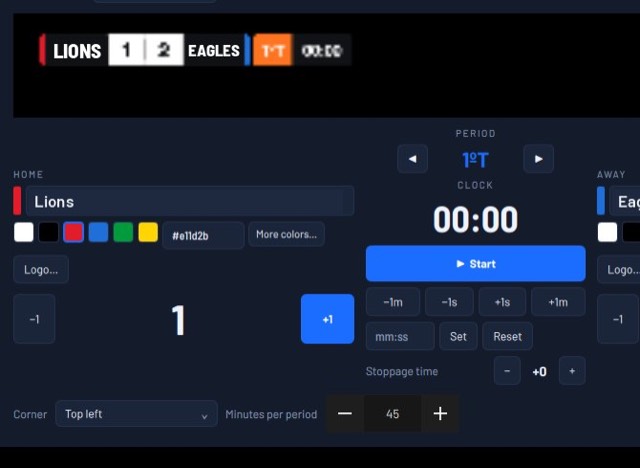
In NWK Live Production all of this is in the Scoreboard window: the HOME and AWAY sides with name, color and Logo…, and the settings Corner and Minutes per period. The sports scoreboard in NWK describes the window and what each sport shows.
Who operates, and from where
The scoreboard needs someone who watches the game, not the monitors. The person who switches cameras is looking at the next shot at the moment of the goal. With two people, one switches and the other runs the scoreboard; with one person, the scoreboard keys have to be reachable without looking.
| Where | How |
|---|---|
| At the production computer | Keys F5 to F10. In NWK the shortcuts work with the scoreboard window closed |
| At the side of the court or field | On a tablet or phone, in the browser, with the scoreboard's own PIN: points, time, names, colors and logos |
Browser operators explains how the address and the PIN work.
During the game: one action for each event
| What happens | What the operator does in NWK |
|---|---|
| Starting whistle, restart after a stoppage | F7 starts the clock |
| Goal or point confirmed | F5 for home, F6 for away. In basketball, the +2 and +3 buttons of the window |
| Point canceled or added by mistake | Shift + F5 or Shift + F6 undoes it |
| Foul | F9 for home, F10 for away |
| Change of possession or serve | Shift + F7 |
| Clock stopped by the referee | F7 stops the clock |
| End of the period | F8 goes to the next period. In volleyball, Close the set |
| Stoppage time in soccer | Stoppage time, with − and + |
Wait for the referee's confirmation before adding the point. A goal added and removed ten seconds later is worse than a goal added three seconds late.
The clock and the corrections
The official time is the referee's or the scorer's table's. The clock on the stream is a reference for the audience, and it drifts: the operator starts a second late, or misses a stoppage. Correct at a stoppage in play, when nobody is looking at the clock. The NWK window has −1m, −1s, +1s and +1m, and a field to type the time as mm:ss and click Set. In futsal and basketball the clock counts down.
If there is a scoreboard in the venue, keep it inside the view of a camera or of the operator. Comparing the two at each stoppage takes one second.
Halftime and the end of the game
- At halftime, when the teams change ends, Swap sides inverts home and away on the scoreboard.
- The scoreboard goes on air with Put on air (Overlay 1) and stays on top of Program while you cut cameras. To show a full-screen graphic or the halftime program, take it off with the overlay's button or the F1 key, and put it back before the restart.
- New game resets everything, after asking for confirmation. Use it before the next game, never while the final score is still being shown.
- In a tournament with games one after another, a project can have more than one scoreboard, and the window shows a list to choose which one to run.
Replays of the important plays are another job, with another operator when possible. See streaming a game with scoreboard and replay.
Test before the whistle
- Press each key and watch the scoreboard: point, undo, clock, period, foul.
- If the keys do not respond, click Create these shortcuts in the scoreboard window. The keys can be changed in Shortcuts and Triggers; see create my own shortcuts.
- Start the clock, stop it and set a time by hand.
- On the tablet, open the address, type the PIN and add and remove a point.
- Reset everything with New game before the real game starts.
Related questions
Who should operate the scoreboard on a live stream?
One person who watches the game and does nothing else during play. The person who switches cameras is looking at the next shot when the goal happens. When there is only one person, the scoreboard has to be operated by keys that can be pressed without looking.
How do I fix a wrong score during the game?
Undo it at once. In NWK Live Production, Shift + F5 undoes a point for the home team and Shift + F6 undoes a point for the away team, and the −1 button in the scoreboard window does the same. Do not wait for a stoppage to correct the score; wait only to correct the clock.
Does the clock on the stream have to match the referee's clock?
The official time is the referee's or the scorer's table's, and the clock on the stream is a reference for the audience. Keep the two close: start at the whistle and correct the difference at a stoppage in play, using the adjustment buttons or typing the time.
In the NWK help center
- Run a sports scoreboard
- Put titles and images on top with overlays
- Create my own shortcuts
- Operators in the browser
Written and reviewed by the NWK Live Production team (Setor 360 Tecnologia e Eventos Ltda). Published .
NWK has a scoreboard for soccer, futsal, volleyball and basketball, operated by the F5 to F10 keys or from a tablet in the browser.
Try NWK free for 7 days