Short answer
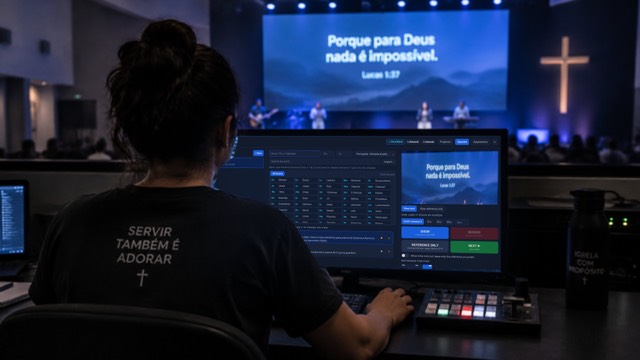
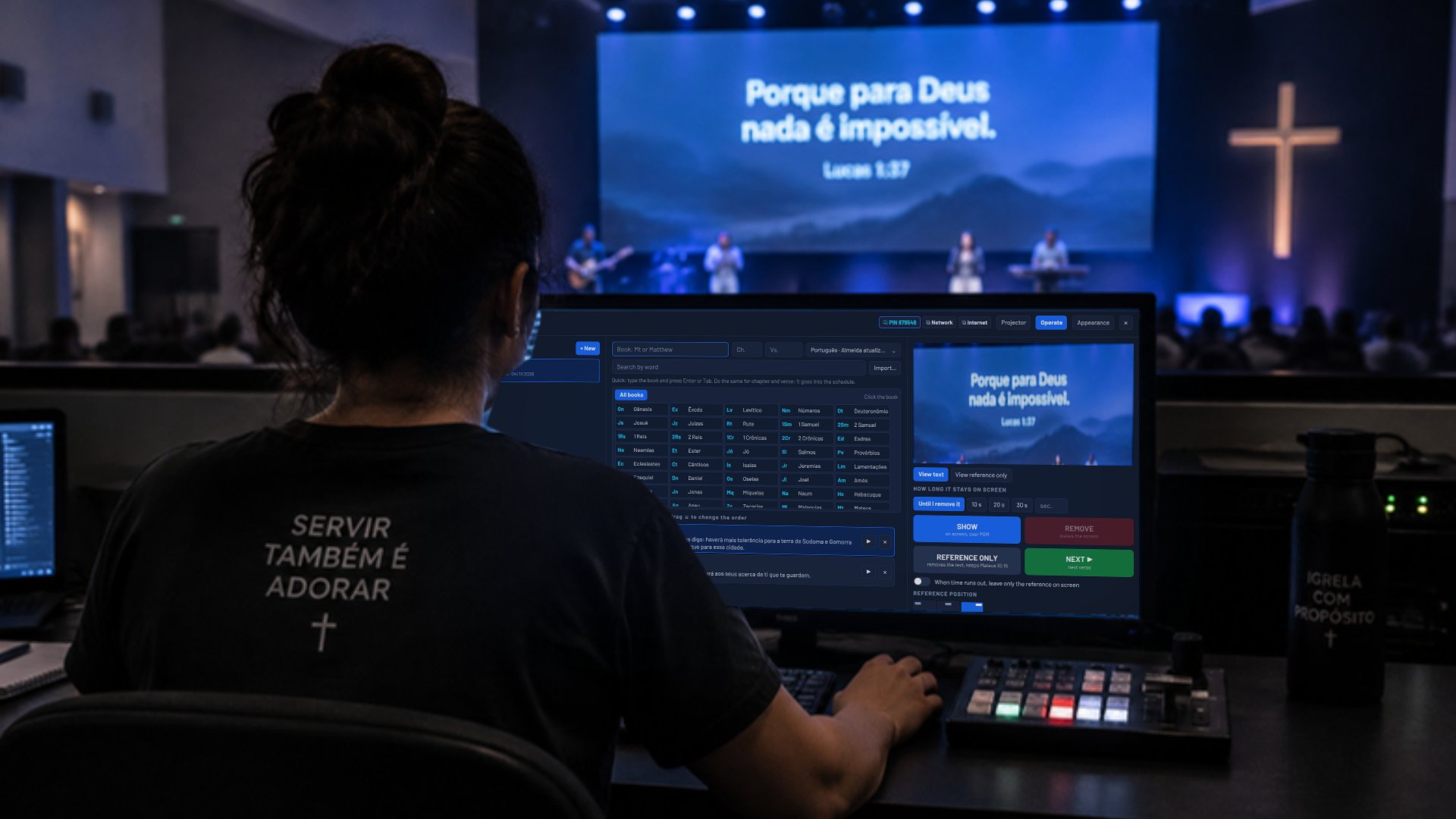
To show Bible verses on a live stream, the text has to reach the production program as a transparent layer over the camera picture. Many churches do this with a separate presentation program, sent to the stream through a second computer or a capture device. NWK Live Production has a Bible input and a song lyrics input of its own: you search the verse or choose the song, and the text goes over the Program through an overlay, with the reference in the corner. No second program or second computer is involved.
On this page
What a separate program costs
A presentation program made for the projector fills the whole screen with text, because the congregation in the room needs to read from far away. The stream needs the opposite: the camera picture with the text in the lower part, so the person watching at home sees the preacher and the verse together.
Joining the two takes a second output or a second computer, a way to bring that signal into the stream, and a way to make its background transparent. Each of these is one more thing to connect, configure and check on Sunday morning, usually by volunteers. When the text is produced inside the production program, these steps do not exist.
The Bible in NWK
The Bible input comes with versions that are free to use, in Portuguese, English, Spanish, French and German. The operator types the book, the chapter and the verse, or a whole reference such as mt 12:25, or searches for a word of the text. A range such as 25-27 also works. See add the Bible and choose the version.
Each verse found goes into a schedule. During the service the operator uses four buttons: SHOW, REMOVE, REFERENCE ONLY and NEXT. REFERENCE ONLY takes the text off and leaves the reference, such as Matthew 12:25, while the preacher comments on the passage. See show, remove and advance verses.
Song lyrics in NWK
The lyrics input accepts songs typed, pasted or imported from TXT, LRC, ChordPro, OpenLyrics and OpenSong files, several at once. A blank line separates the slides, and a line in brackets, such as [Chorus], names the part so the operator does not get lost. A block with more lines than fit is split into more slides.
Every song typed or imported stays in My songs and can be added to a new list in one click. At the end of a song, NEXT goes to the first part of the next song in the list. See add and import song lyrics.
Prepare during the week, operate on Sunday
Verses and songs are organized in schedules and song lists prepared ahead of time. A schedule can be marked with the dates on which it will be used, and the one for today appears marked in the list. Schedules can be duplicated for another service and exported to a file, to keep a copy or take them to another computer. See verse schedules and song lists.
The Bible and the lyrics can each be operated by a volunteer on a tablet or phone, in the browser, with a PIN, from anywhere in the building. Browser operators with a PIN explains how this works, and streaming a church service with three cameras shows where it fits in the whole setup.
How the text looks
| Background | What the audience sees | Good for |
|---|---|---|
| No background | Only the text, over the camera picture | A dark, even picture behind the text |
| Behind the letters | A box or an edge-to-edge bar behind the text | The stream, with the preacher still visible |
| Full screen | A background, a color or an image covering the whole Program | Reading a long passage, or a moment of worship without camera |
You start from a ready-made style and adjust font, size, color, shadow, position and the reference, and you can save your own style. The text can shrink automatically when it does not fit. See Bible and lyrics appearance.
Versions and rights
NWK only includes Bible versions that are free to use, in the public domain or under an open license. Other translations may be protected and require a license. If your church has the right to use one of them, NWK imports the file in Zefania XML or plain text, and the imported Bible stays on that computer only.
Song lyrics are also protected works in most cases. Showing them in a service and on a public stream may depend on a license. Ask the organization that manages these rights in your country.
Related questions
Which Bible versions come with NWK?
NWK comes with versions that are free to use, in Portuguese, English, Spanish, French and German, such as the King James Version and the World English Bible in English. Translations that require a license are not included; a church that has the right to use one can import the file.
Can I prepare the verses and songs before the service?
Yes. In NWK the verses go into schedules and the songs into song lists, which can be prepared ahead, marked with the dates of use, duplicated and exported to a file.
Does the verse cover the camera picture?
It depends on the background you choose in NWK. With no background or with a box behind the letters, the text sits over the camera picture. With the full-screen background, the text covers the whole Program.
In the NWK help center
- Add the Bible and choose the version
- Show verses and slides on screen
- Add and import song lyrics
- Verse schedules and song lists
- Bible and lyrics appearance
Written and reviewed by the NWK Live Production team (Setor 360 Tecnologia e Eventos Ltda). Published .
NWK has a Bible input and a song lyrics input, with schedules, ready-made styles and operators in the browser.
Try NWK free for 7 days